
Product Catalog Stats
Learn how the Stats tab helps you track catalog coverage, recommendation reach, and engagement performance across channels.
Overview
The Stats tab provides an overview of how items in a catalog are used across recommendations and engagement channels. It helps you understand the reach and engagement performance of recommendations across channels. Stats are populated only once a recommendation strategy is using the catalog. Until then, both sections show No engagement data available and No recommended products found, with the subtext No strategies are using this catalog yet. This is expected for a newly uploaded catalog.
To create a catalog, refer to Upload Product Catalog.
Engagement Channel-wise Breakdown
This section shows how catalog-driven messages perform across supported engagement channels. Metrics are calculated based only on messages that include catalog items.
The following table describes each column:
| Column | Description |
|---|---|
| Channel | The engagement channel through which catalog-based messages were sent. Supported channels include Email, SMS, WhatsApp, Push, In-App, and Web push. |
| Total number of Engagements | The total count of campaigns, journeys, or other messaging touchpoints that used catalog items on that channel. |
| Total number of Messages | The total number of messages sent that included catalog items on that channel. |
| Total number of items recommended | The total number of catalog items recommended through messages on that channel. |
| Average Click Through Rate | Clicks divided by messages sent on that channel, as a percentage. |
The following image shows the Stats page:
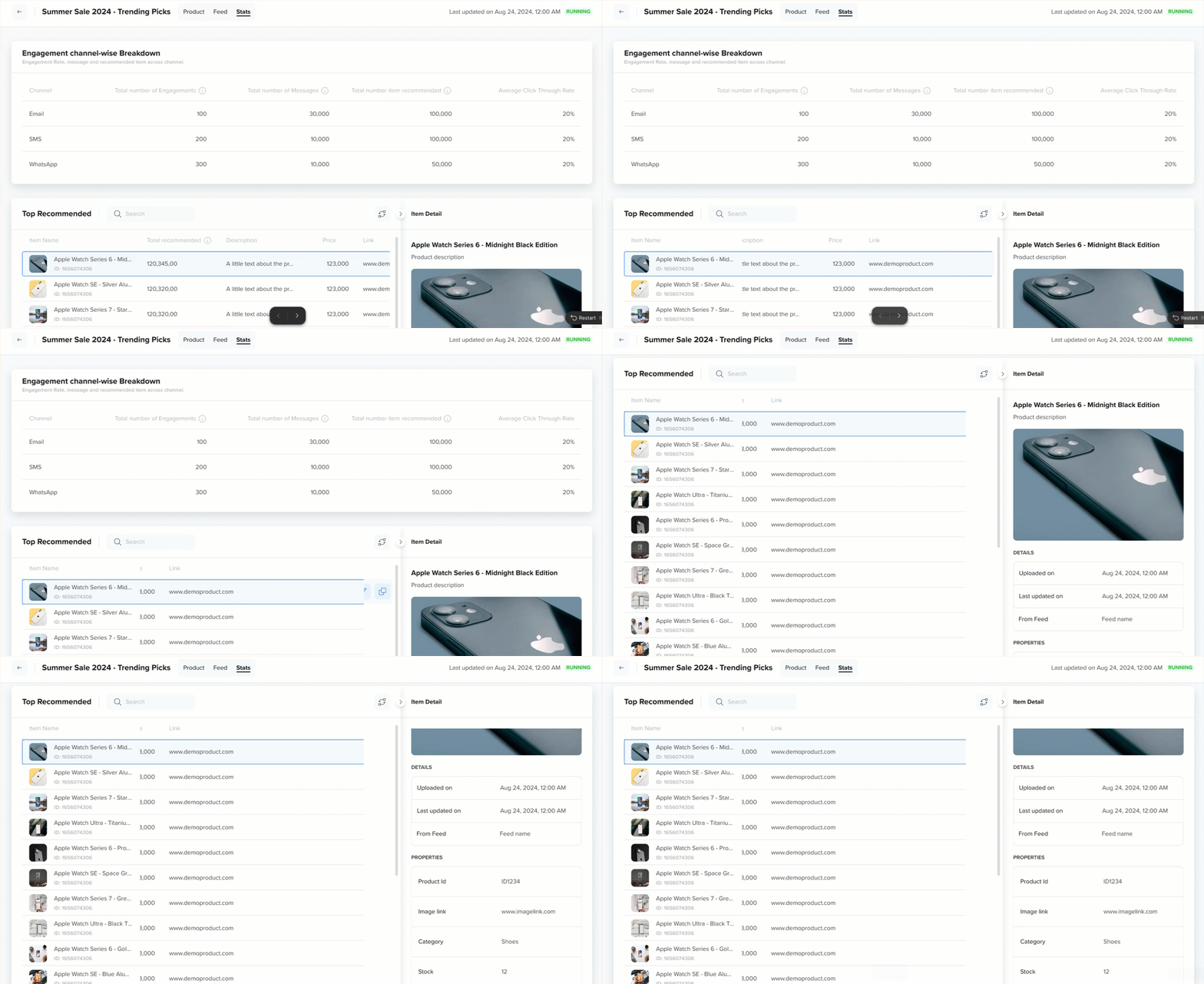
Catalog Stats
Top Recommended
This section lists the most frequently recommended products from the catalog. Use the Search field to find a specific item by name.
The following table describes the default columns in the list.
| Column | Description |
|---|---|
| Item Name | The name of the recommended product, along with its catalog item ID. |
| Total recommended | The number of times the item has been recommended to users. |
| Description | The product description, sourced from your catalog's description attribute. |
NoteThe Top Recommended table shows exactly three columns: Item Name, Total Recommended, and Description. These columns are fixed and do not change based on your catalog schema. Other attributes, such as Price or Link, are not shown as columns in this table. To view an item's full set of attributes, select the item to open the Item Detail panel.
Item Detail
Selecting a row opens the Item Detail panel on the right, which displays information about the selected product. It is organized into two subsections: Details and Attributes.
Details
The Details subsection shows system-level metadata for the selected product.
| Field | Description |
|---|---|
| Product ID | The unique identifier assigned to the product in the catalog. |
| Times recommended | How many times has the item been recommended over the selected period? |
Attributes
Attributes
The Attributes subsection shows the attributes defined in your catalog schema for the selected product. The fields displayed here vary depending on the catalog's schema.
Shows the custom attributes stored for the selected product. The fields displayed here vary depending on your catalog's schema, for example, category, brand, price, or stock. These are not fixed system fields.
Updated about 2 months ago