
Brand Context
Learn how to set up a consolidated Brand Context for your account.
Overview
Brand Context serves as the system prompt for all AI features in CleverTap. It captures your brand's core identity and communication style, ensuring that every AI-generated asset, copy, and creative reflects how your team sounds and presents itself. The more accurately you define this information, the more closely AI-generated content will align with your brand voice.
It is configured once, at the account level, and applies across Scribe, Email Template Creator, WhatsApp Template Creator, Image Creator, Journey Builder, and Analytics. Defining Brand Context once removes that manual correction step across all six agents.
With Brand Context, you get:
- On-brand output by default: AI uses your tone, description, and industry to generate content that sounds like your team wrote it, reducing the need for post-generation edits.
- Faster campaign creation: Less time spent briefing or correcting AI tools means faster turnaround from idea to published campaign.
- One brand definition across your account: Brand Context is configured once at the account level, so all your agents draw from the same brand definition.
Accessing Brand Context
You can access and manage Brand Context from the Settings section of your account. Brand Context is configured at the account level.
Brand Context permissions are managed through Role-Based Access Control (RBAC) as follows:
| Role Type | Default Access |
|---|---|
| Admin | Read and Write |
| System Roles (for example, Admin, Marketing Manager) | Read-only |
| Custom Roles (for example, Content Executive, Analyst) | Configurable |
Configure Brand Context
To configure Brand Context, perform the following steps:
- Go to Settings > CleverAI > Brand Context and click Edit.
- Enter your brand details under the About Your Brand section and click Save.
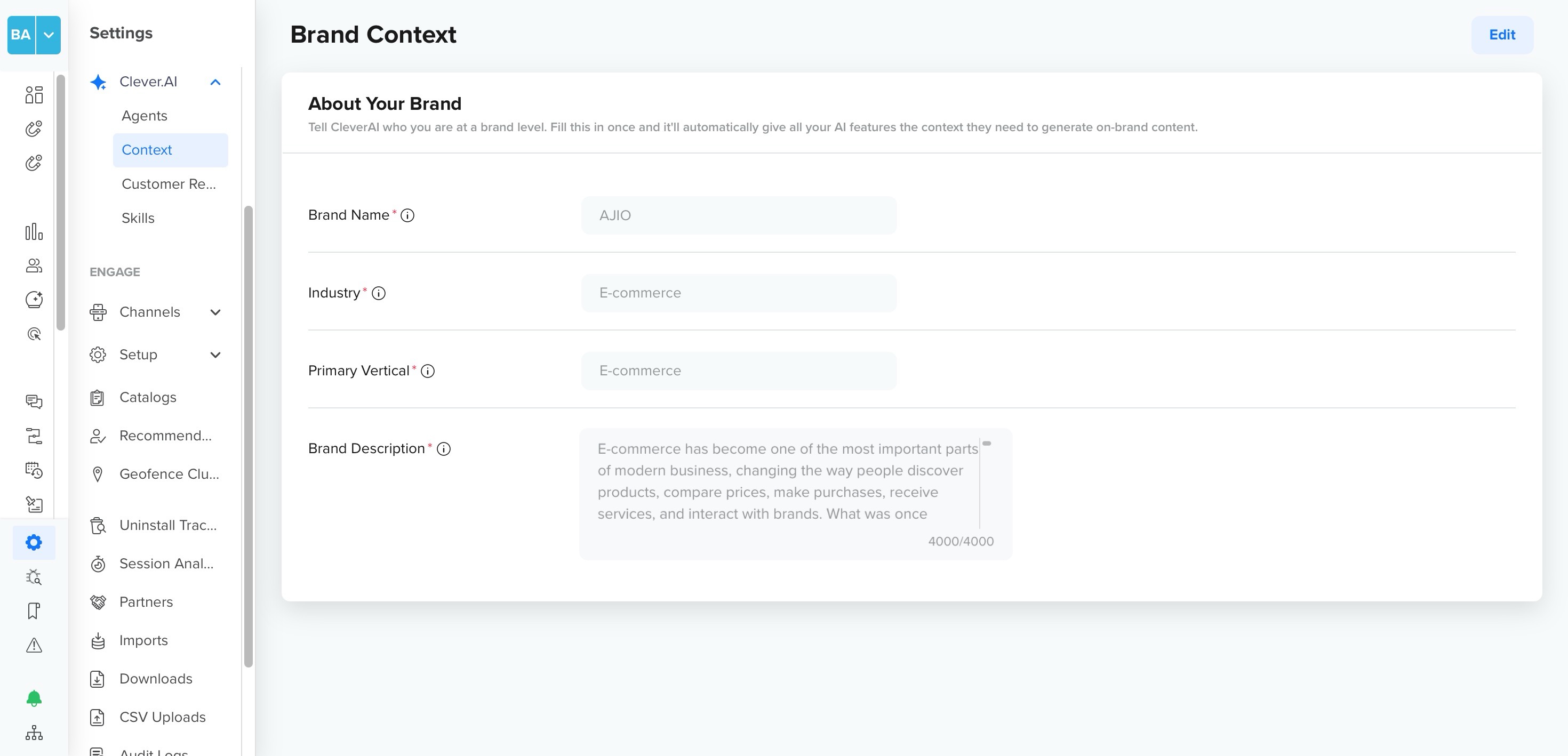
Brand Context
The following details are required:
- Brand Name: The name of your brand as it should appear in AI-generated content. For example, Urban Threads.
- Industry: The industry your brand operates in. For example, Retail.
- Primary Vertical: The primary business vertical or category your brand operates in. For example, E-commerce.
- Brand Description: A description of your brand, what it does, and who it serves. Acts as the core system prompt for all AI features. Character limit: 4000. For example, Urban Threads is a fast-growing online fashion retailer for young professionals across Southeast Asia. We combine trend-forward pieces with affordable pricing. Our tone is upbeat, approachable, and never preachy.
NoteThe Brand Description has the most direct influence on AI output quality. A well-written description that captures your brand's purpose, audience, and value proposition will produce significantly more on-brand content.
Sample Brand Context
The following are example entries you can reference when filling in your Brand Context fields. Use these as a starting point and adapt them to reflect your brand accurately.
| Industry | Brand Description |
|---|---|
| Consumer / Retail | This brand is a fast-growing e-commerce platform that helps everyday shoppers discover great deals across fashion, electronics, and home essentials. We make shopping simple, affordable, and enjoyable for millions of users across Southeast Asia. |
| Financial Services / Banking | This brand is a digital-first banking platform offering savings accounts, personal loans, and investment products to urban millennials. We help users make smarter financial decisions with transparency, security, and zero hidden fees. |
| Healthcare / Pharma | This brand is a digital health platform connecting patients with licensed doctors for online consultations, prescription management, and wellness tracking. We are committed to making quality healthcare accessible, compassionate, and convenient. |
| Food & Beverage | This brand is a healthy meal delivery service that brings nutritionist-approved, chef-prepared meals to your door. We believe eating well should be effortless, delicious, and guilt-free — every single day. |
| Gaming / Entertainment | This brand is a mobile gaming platform featuring competitive multiplayer games, daily tournaments, and real-money rewards. We bring the thrill of the arcade to your phone, with fast-paced gameplay designed for serious and casual gamers alike. |
| Technology / SaaS / B2B | This brand is a B2B data integration platform that helps engineering and analytics teams unify data from disparate sources in real time. We enable faster decisions, cleaner pipelines, and greater operational efficiency for data-driven organizations. |
FAQs
Can I edit Brand Context after saving it?
Yes. Click Edit on the Brand Context page to update any field at any time. Changes take effect immediately across all AI tools once saved.
Can I assign Brand Context to multiple teams?
Brand Context is configured at the account level. When Teams is enabled, access visibility follows team-based permissions. For more information, refer to Teams Setup.
How does Brand Context affect AI-generated content?
Brand Context acts as the system prompt for all AI features. The AI uses your brand name, industry, tone, and description to shape the language, style, and direction of generated content. The more complete your Brand Context, the more closely outputs will reflect your brand voice.
What happens if Brand Context is incomplete?
AI tools will still function, but generated content may default to generic tone and style. Filling in all fields, especially Brand Description and Tone of Voice, significantly improves output relevance and brand alignment.
Updated about 2 months ago