
JioCX
Learn how to configure JioCX as a provider for CleverTap.
Overview
JioCX enables businesses to deliver rich, interactive messages with branded content and multimedia. When integrated with CleverTap, it streamlines RCS campaigns, supports message tracking, and automates workflows for personalized engagement. SMS fallback ensures reliable delivery, enhancing customer communication and optimizing messaging strategies.
Prerequisites
Before you can start using JioCX RCS with CleverTap at scale, ensure the following prerequisites are completed:
RCS Agent Onboarding
To use RCS via CleverTap, you must have an RCS Agent registered with JioCX. The onboarding process includes:
- Registering your business with JioCX as an RCS sender.
- Submitting brand details and receiving approval from mobile carriers.
- Completing the agent verification process with JioCX.
JioCX API Credentials
To integrate JioCX with CleverTap, you will need the following credentials from your JioCX dashboard. Have these ready before configuring the provider in CleverTap:
- Base API URL: The primary HTTPS endpoint for JioCX's RCS API, used to establish the connection between the two platforms. For more details, refer to the JioCX documentation.
- API Key: Used to authenticate CleverTap's requests to JioCX. Ensure it has RCS & SMS messaging scopes enabled. For more details, refer to the JioCX documentation.
Callback URL Configuration
Once you save your provider settings in CleverTap, a Callback URL is automatically generated. This single URL handles both inbound message forwarding (user replies sent back to CleverTap) and delivery status reporting. You will need to paste this URL into the JioCX portal against your RCS sender.
RCS Setup in CleverTap
Once your RCS Agent is onboarded, configure RCS settings in CleverTap:
- Navigate to Settings > Channels > SMS Direct in your CleverTap dashboard.
- Select JioCX RCS as the provider and enter the required credentials.
- Configure message templates, sender IDs, and any additional settings needed for your use case.
RCS Agent Go-Live
After setup, your RCS Agent will go live following a brief testing phase:
- JioCX and CleverTap will validate message delivery and subscriber management flows.
- Once testing is successful, your RCS Agent will be fully activated for sending messages.
Set Up JioCX on CleverTap Dashboard
To successfully integrate JioCX with CleverTap, follow the steps below to configure your RCS settings and ensure seamless communication between the two platforms.
-
Go to Settings > Channels > SMS > SMS Direct and click + Add Provider.
-
Add the following details:
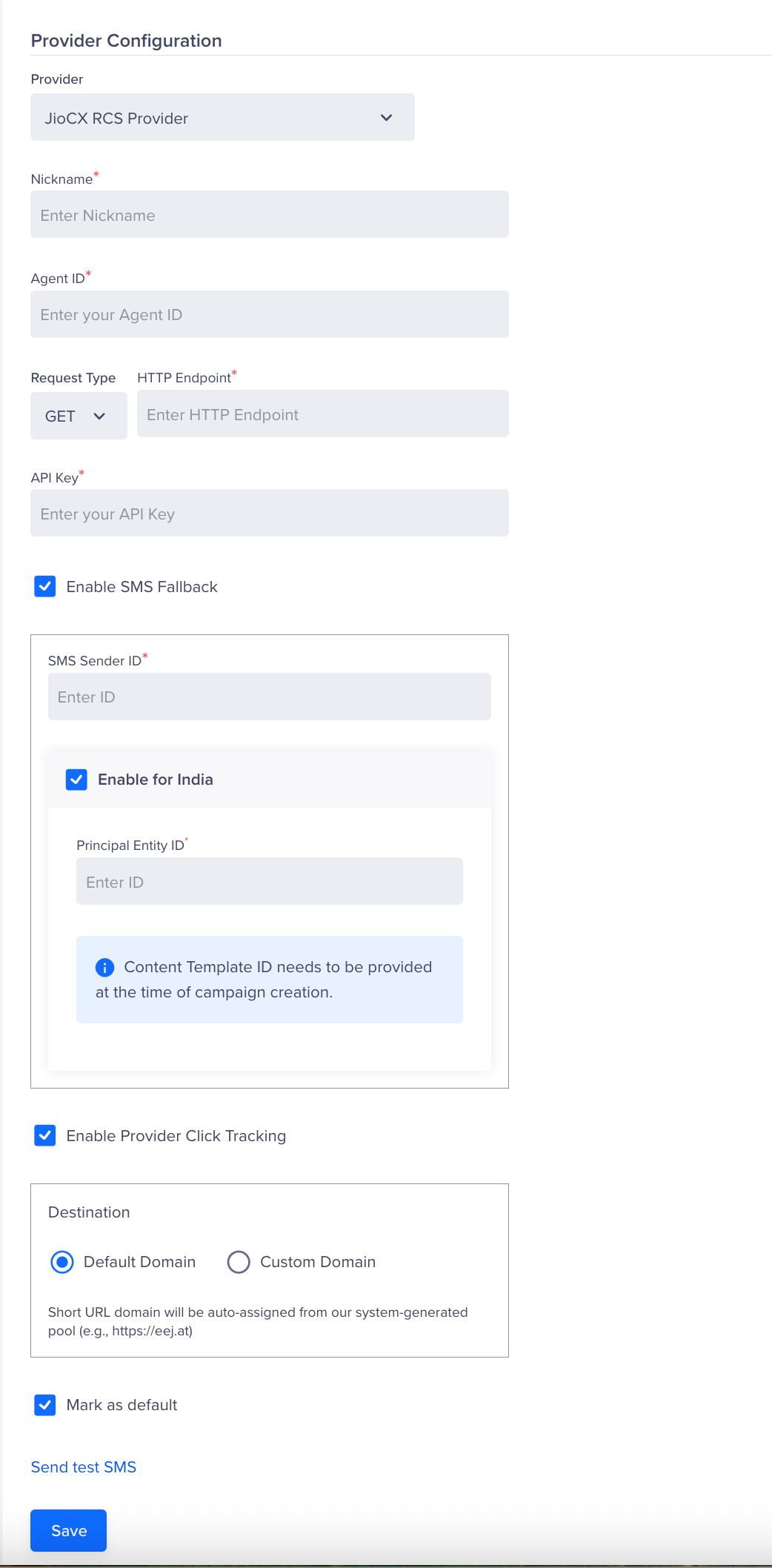
Jio CX Provider
-
Provider
Select JioCX RCS Provider from the drop-down menu.
-
Nickname
A customizable label for your JioCX RCS integration. This name helps you easily identify and manage the integration within the CleverTap dashboard, making it convenient to distinguish between multiple configurations.
-
Agent ID
The unique identifier of your RCS Agent registered with JioCX. Retrieve this from your JioCX dashboard and enter it here.
-
Callback URL
This URL is automatically generated by CleverTap after your provider settings are saved. It serves as a single endpoint that handles both inbound message forwarding and delivery status reporting. Paste this URL into the JioCX portal against your RCS sender as described in the Callback URL Configuration section.
-
Request Type and HTTP Endpoint
Select
POSTas the request type and enter the Base API URL retrieved from your JioCX dashboard. This establishes the connection between CleverTap and JioCX. -
API Key
Enter the API Key retrieved from your JioCX dashboard. This authorizes CleverTap to send RCS messages via JioCX.
-
Enable SMS Fallback
SMS fallback ensures message delivery when RCS messages fail due to factors like device incompatibility, lack of internet access, or carrier restrictions. If the recipient's device doesn't support RCS or is offline, the message is automatically sent as an SMS to maintain uninterrupted communication.
When SMS fallback is enabled, the following fields are required:
-
SMS Sender ID: The sender ID or number used to send fallback SMS messages.
-
Enable for India: Select this checkbox if SMS fallback applies to recipients in India to comply with local messaging regulations.
-
Principal Entity ID: Required for businesses sending messages to users in India. DLT (Distributed Ledger Technology) registration is mandatory as per TRAI regulations. The Principal Entity ID (PE ID) is the unique identifier assigned to your business on the DLT platform.
NoteIf using CleverTap as your RCS provider, you must purchase SMS from CleverTap to enable fallback. If using a different SMS provider, configure SMS fallback via CleverTap Journeys.
-
-
Enable Provider Click Tracking
This feature allows you to track clicks on links within your RCS messages, providing insights into user engagement.
-
Default Domain: Uses JioCX's default domain to automatically generate trackable links for your RCS messages.
-
Custom Domain: Uses your own domain for link tracking, keeping your brand consistent while still capturing engagement data. Retrieve your verified custom domain from the JioCX dashboard and enter it here.
JioCX Click Tracking IntegrationCleverTap offers native click tracking for RCS campaigns, so enabling provider click tracking is optional. If you enable JioCX's click tracking, all URLs in your RCS messages will be shortened and tracked by JioCX's system.
Important: Avoid enabling both CleverTap's and JioCX's click tracking simultaneously. Doing so may result in duplicate URL wrapping, inconsistent or inflated click metrics, or double event tracking.
For accurate and consistent analytics, we recommend using only one click-tracking system per campaign.
-
-
Mark as Default
Designates JioCX as your primary service provider for RCS messages, ensuring all outgoing RCS campaigns are routed through JioCX by default.
- Click Send Test SMS to verify that the integration is functioning correctly. You will be prompted to enter the following details:
- Country Code & Phone Number: The recipient's country code and phone number for the test message.
- RCS Message: The message content to be sent via RCS.
- SMS Fallback Message: The fallback message content to be sent via SMS if RCS delivery fails.
- Template ID: The template ID required for message sending, if applicable.
- Principal Entity ID (only if opted for India): The registered Principal Entity ID required to comply with DLT regulations.
- Click Save after successfully verifying the integration.
Once the provider is added, navigate to the Provider Listing page for Provider Operations.
Updated 3 months ago