
Alot Solutions
RCS Provider
Overview
Alot Solutions is a Communications Platform as a Service (CPaaS) provider that enables businesses to engage customers across multiple channels. Its integration with CleverTap lets businesses send RCS campaigns directly from the CleverTap dashboard using Alot Solutions' RCS infrastructure, with delivery report (DLR) tracking for delivery status and visibility into campaign performance.
Private BetaGeneric RCS is an integration method that connects Alot Solutions to CleverTap. Generic RCS is available as part of the RCS Connect add-on and is currently in Private Beta for select CleverTap accounts. For early access to this feature, contact your Customer Success Manager or Account Manager.
Here are a few use cases where businesses can integrate Alot Solutions with CleverTap:
- Send RCS campaigns using approved templates.
- Trigger transactional and promotional messages based on CleverTap segments and user behavior.
- Track delivery status and inbound user messages using CleverTap callbacks.
Support for IntegrationsThis integration is managed and supported by Alot Solutions. For any questions or issues related to this integration, contact Alot Solutions support.
Prerequisites
Before configuring Alot Solutions as your RCS provider in CleverTap, ensure the following are in place:
- The RCS Generic Campaigns feature is enabled on your CleverTap account.
- You have an active Alot Solutions account with RCS Services access.
- A provisioned, active RCS Agent in Alot Solutions.
- RCS-approved message templates in your Alot Solutions dashboard.
- An API key for your Alot Solutions account, available from your Alot Solutions point of contact.
- (Optional) An SMS Sender ID and SMS body parameters from Alot Solutions, for SMS fallback.
- (Optional) Distributed Ledger Technology (DLT) registration, including the Principal Entity ID and the approved template IDs, for SMS fallback when you send messages in India.
RCS Agent Onboarding
An RCS Agent is a brand's verified business profile (the sender). Alot Solutions provisions the RCS Agent, and mobile carriers approve it. CleverTap uses the RCS Agent ID as the RCS Sender ID during provider setup to authorize and deliver RCS messages.
If you are new to Alot Solutions or have not completed RCS Agent onboarding, complete the onboarding in the Alot Solutions platform before you set up the provider in CleverTap.
The onboarding process includes the following steps:
- Registering the business with Alot Solutions as an RCS sender and creating the brand profile (name, logo, description, and website).
- Submitting brand and compliance details for carrier review and obtaining approval for RCS messaging.
- Completing the Alot Solutions verification checks, such as domain or business verification.
- Receiving the RCS Agent ID from Alot Solutions.
To find the RCS Agent ID, go to Config > RCS Agent in the Alot Solutions platform. You enter this value in the RCS Sender ID field in CleverTap during provider setup.
Set Up Generic RCS on CleverTap Dashboard
To configure the CleverTap dashboard, connect Alot Solutions as your RCS provider using the Generic RCS Provider option, as follows:
- Go to Settings > Channels > SMS in the CleverTap dashboard.
- Select the SMS Connect tab.
- Click + Add Provider.
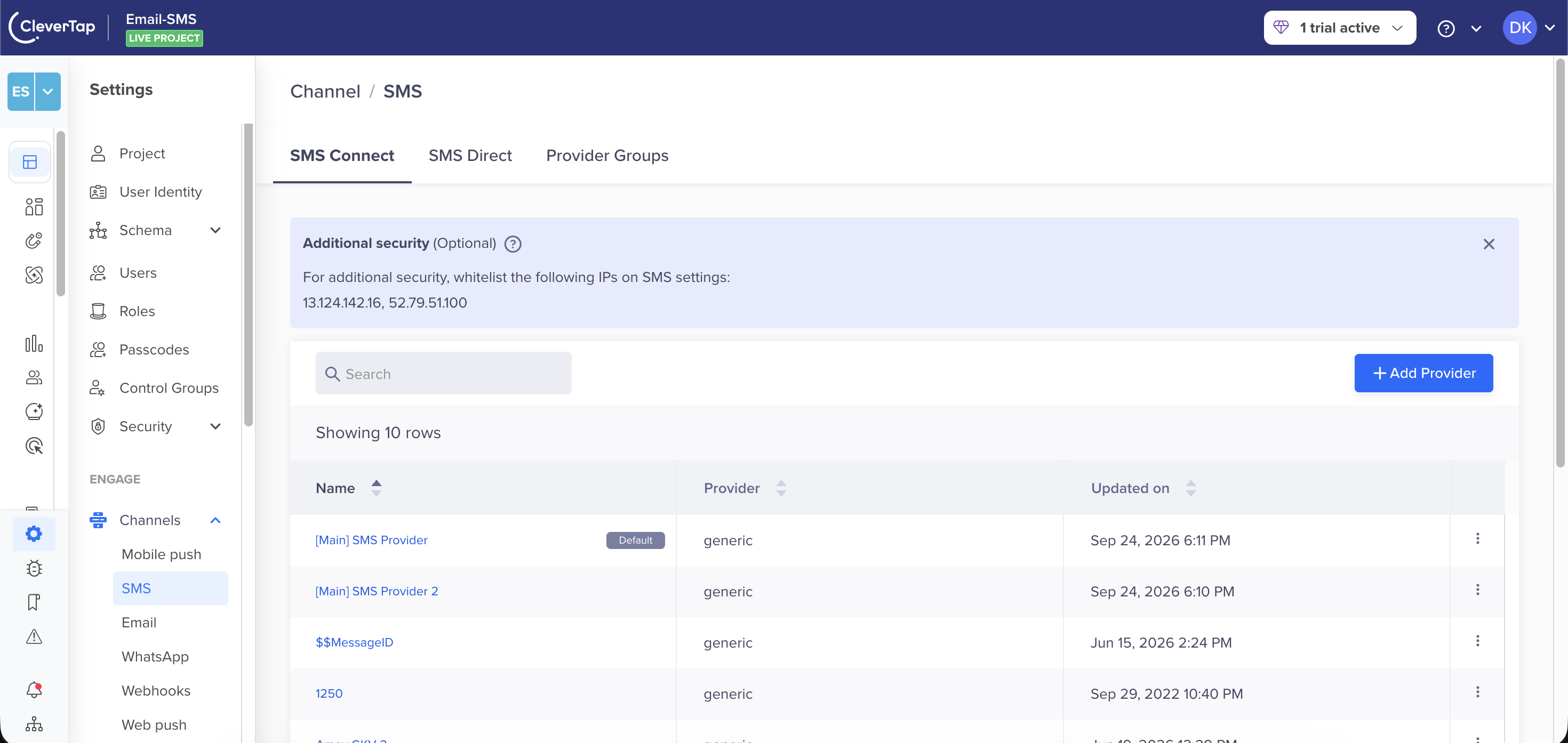
SMS Connect Tab in the SMS Channel
- Under Provider, select Generic RCS Provider from the dropdown and enter the Nickname for this provider setup.
Whitelist IPsFor additional security, whitelist the following IPs on your SMS settings:
13.124.142.16,52.79.51.100.
- Set Up API by entering the Messaging Endpoint and Authentication details.
- Configure RCS Settings.
- Configure SMS Fallback.
- Select Mark as Default to set Alot Solutions as your primary RCS provider for all RCS messaging in CleverTap.
- Click Send Test to verify the integration. Enter the following details:
- Country Code and Mobile Number: Enter the recipient's country code and mobile number for the test.
- RCS Message: Enter the message content to send via RCS.
- Click Save after verifying that the integration was successful.
Once the provider is added, go to the Provider Listing page for Provider Operations.
Set Up API
To set up the API, perform the following details:
-
Under Messaging Endpoint, enter the following details. The messaging endpoint is the API URL that Alot Solutions uses to receive RCS send requests from CleverTap.
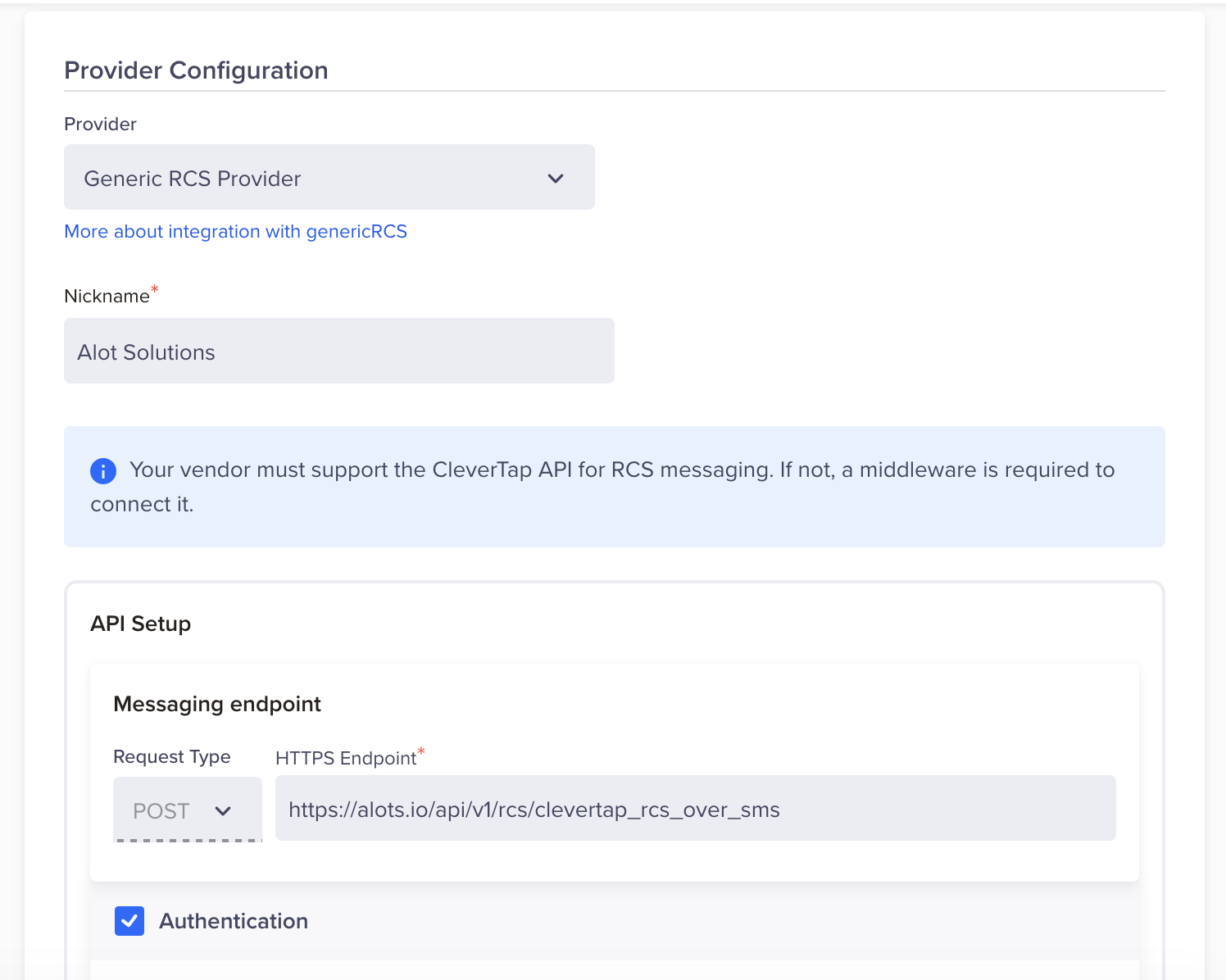
Provider Configuration
Field Description Request Type POSTHTTP Endpoint https://alots.io/api/v1/rcs/clevertap_rcs_over_sms -
Under Headers, add the following key-value pairs. Alot Solutions uses bearer token authentication passed as an HTTP header.
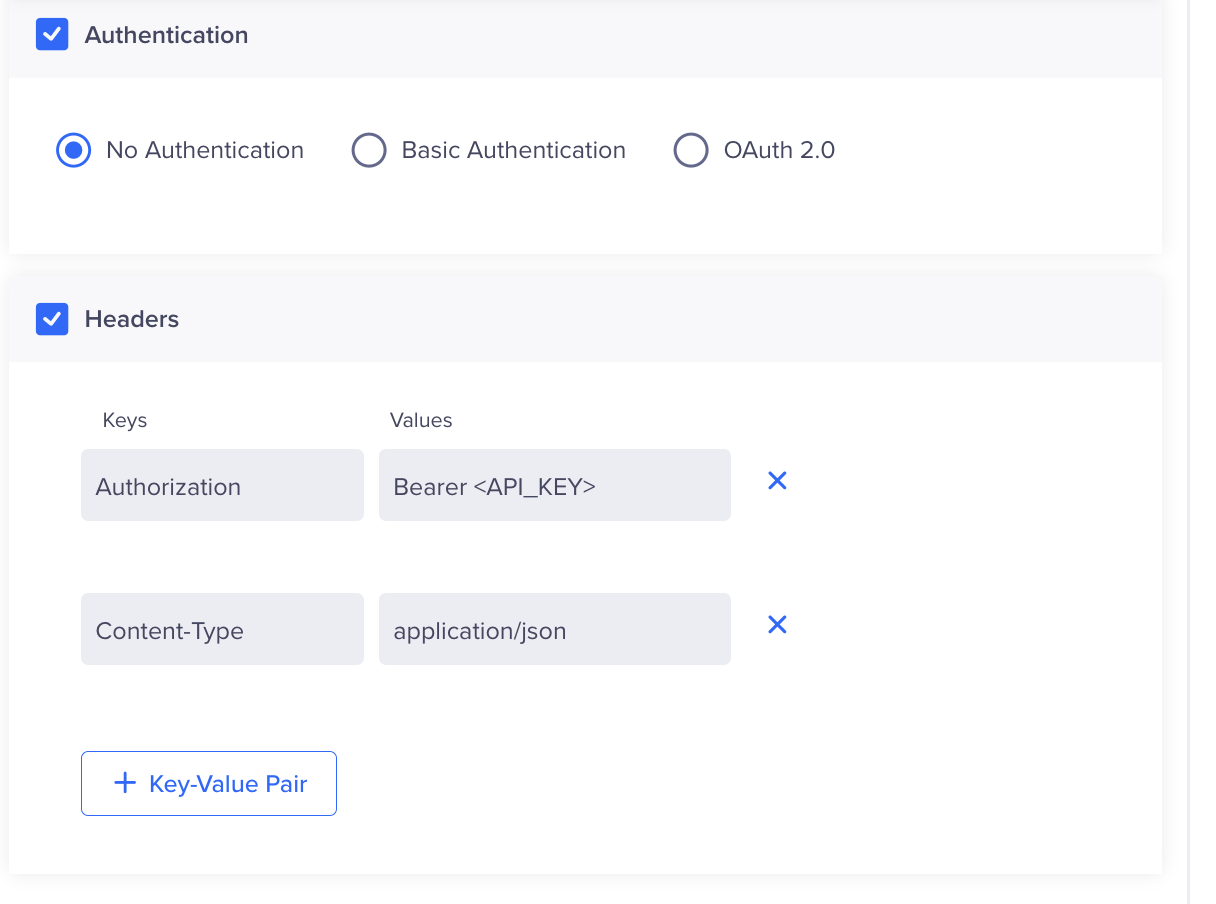
Headers section in the Provider Configuration tab
Key Value AuthorizationBearer <API_KEY>
Replace<API_KEY>with the API key provided by Alot Solutions.Content-Typeapplication/json -
(Optional) In the Custom Concurrency field, enter the maximum number of parallel requests that CleverTap sends to the Alot Solutions API at any given time. Set this value based on the throughput limit that Alot Solutions recommends. If you leave the field blank, CleverTap applies its default concurrency settings. The maximum supported rate is 4,600 requests per second.
Configure RCS Settings
The RCS Config section maps your Alot Solutions RCS Agent to CleverTap.
| Field | Description |
|---|---|
| RCS Sender ID | Enter the RCS Agent ID from Config > RCS Agent in the Alot Solutions platform. This is the verified business sender identity used to deliver RCS messages. |
| Callback Config | Contact your Alot Solutions point of contact to share the CleverTap callback URL and complete the callback configuration on the Alot Solutions platform. |
Configure SMS Fallback
SMS fallback ensures message delivery when RCS messages fail due to device incompatibility, lack of internet access, or carrier restrictions. If the recipient's device does not support RCS or is offline, CleverTap automatically sends the message as an SMS.
To enable SMS fallback, select SMS Configuration / Enable Fallback SMS and configure the following:
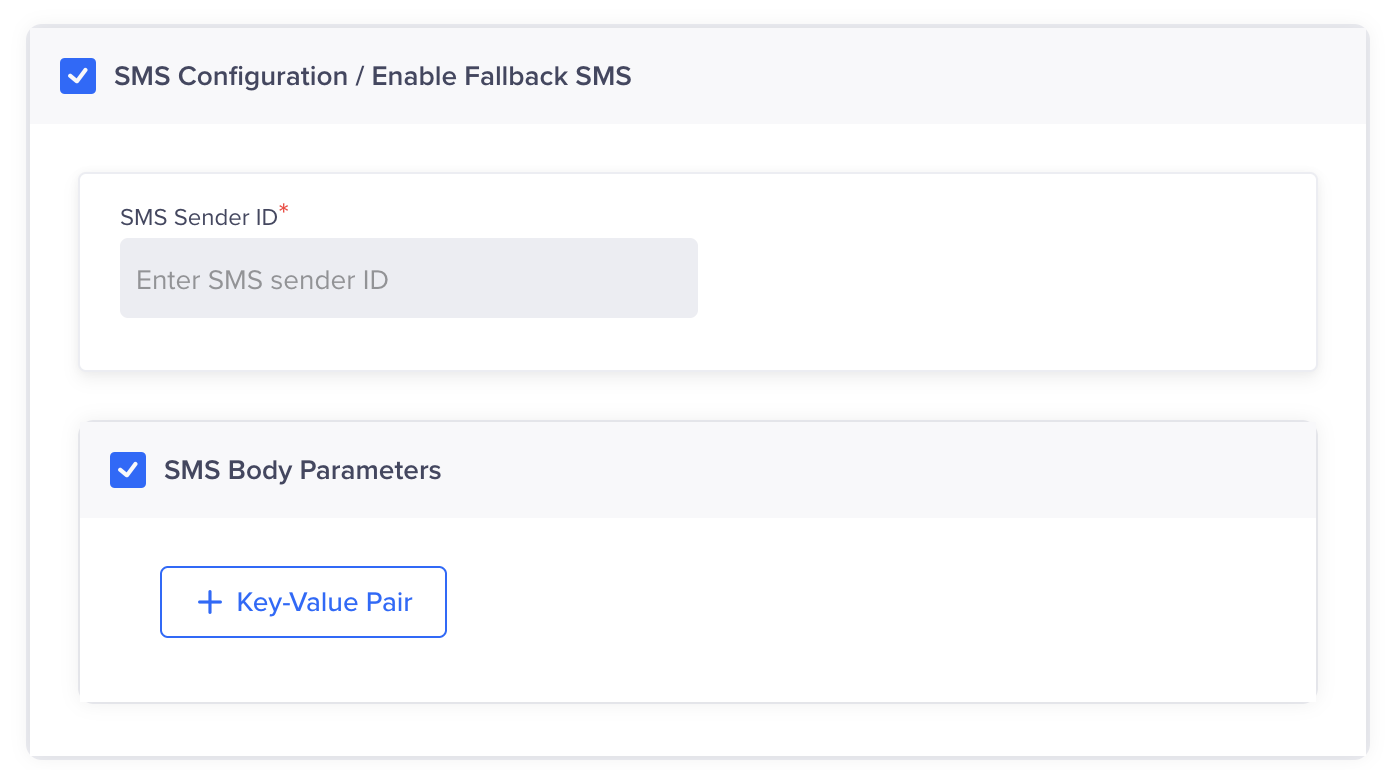
Configure SMS Fallback
- SMS Sender ID: Required when SMS fallback is enabled.
- SMS Body Parameters: Add the key-value pairs required by your SMS fallback configuration.
DLT RegistrationIf you are sending messages in India, DLT (Distributed Ledger Technology) registration is mandatory. Configure the Principal Entity ID and approved template IDs
Add Template
The Add Template feature lets you create, manage, and deploy RCS message templates for your campaigns. If Alot Solutions requires template approval, create the template in the Alot Solutions portal first, then create the same template in CleverTap under Templates. Use the exact same template name in both systems so submissions map correctly.
To access templates, go to Settings > Channels > SMS > SMS Connect, open your Alot Solutions provider, and select the Template tab. CleverTap supports three template formats:
Create Campaign
For detailed instructions on creating an RCS campaign with FirstConnectt as your provider, refer to Create SMS Campaign.
Create Journey
For detailed instructions on creating an RCS journey using FirstConnectt as your provider, refer to Journeys.
Updated about 6 hours ago