
Engage with Predictions
Create data-driven engagement campaigns using prediction results to boost user engagement and optimize conversions.
Overview
By targeting specific user segments with personalized strategies based on their likelihood to take action, you can encourage users to perform the desired goal event. This optimizes your marketing efforts and improves campaign outcomes. This guide walks you through the steps involved in creating effective campaigns and personalized journeys using predictions.
Create Engagement Using Predictions
Engaging with users based on prediction results involves identifying and targeting user segments with customized campaigns and journeys. This section guides you through the steps required to create effective engagements using prediction insights.
From Predictions
To create an engagement from the Predictions page:
- Navigate to the Predictions page on the CleverTap dashboard.
- Select the prediction you want to use for engagement.
- Click Engage and select user segments categorized into High, Medium, and Low likelihood groups.
- Click Proceed. The Create engagement popup opens.
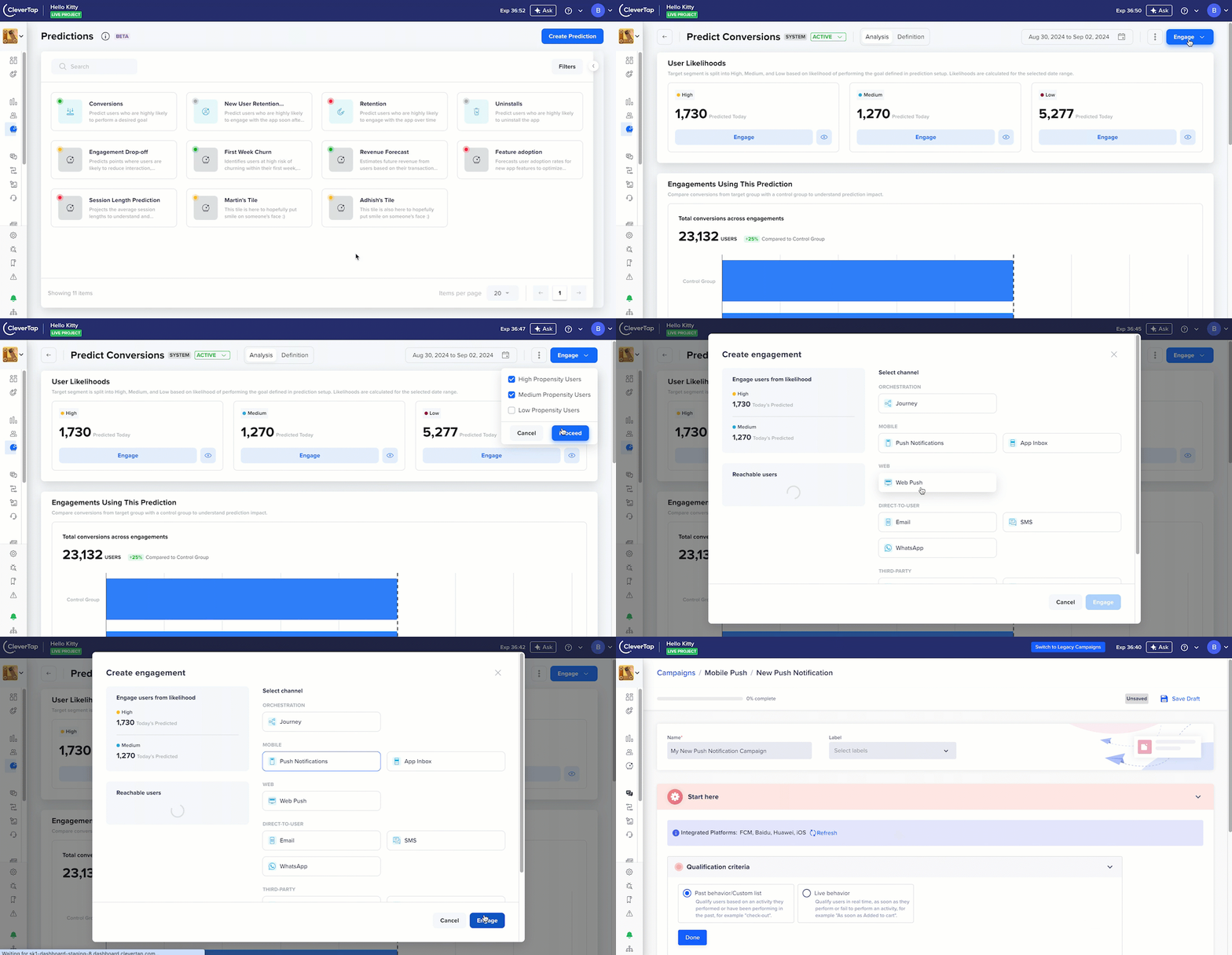
Engage with Predictions Using an App Inbox Campaign
- Select an appropriate channel from the available channel for reaching your target audience.
- Design the Campaign or Journey with relevant, personalized messages and publish it.
Once published, monitor your engagement's performance through the CleverTap dashboard. Track key metrics like open rates, conversion rates, and user engagement to evaluate their effectiveness.
From Campaigns
You can directly engage with your different likelihood groups from the Campaigns page. To do this, follow the standard campaign creation process. In the Who section, when defining your target audience, use the User property section to filter users. For instance, if you want to target users within the Predict Conversions prediction who have a Low likelihood, you can do so by applying the filters shown in the following figure:
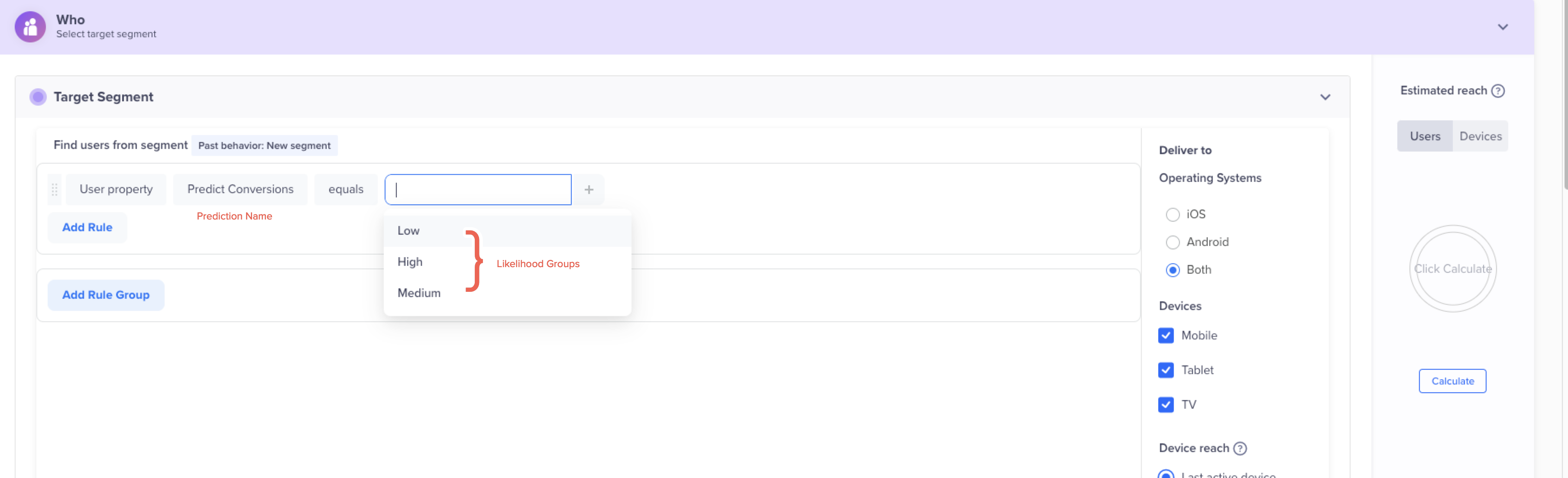
Engage with Target Audience from Campaigns Page
Best Practices
To maximize the impact of your campaigns, consider the following strategies when engaging users based on their likelihood group:
High Likelihood Users
- Strategy: Focus your marketing efforts on this group because these users have a High Likelihood of performing the goal event. Drive conversions with these users using personalized offers and timely reminders.
- Action: Send targeted promotions, limited-time discounts, or exclusive offers to encourage immediate action.
Medium Likelihood Users
- Strategy: These users have a Medium Likelihood of performing the goal event. Use additional incentives or reminders to increase their likelihood of performing the goal event.
- Action: Implement follow-up campaigns, retargeting ads, or educational content to keep these users engaged.
Low Likelihood Users
- Strategy: These users have a Low Likelihood of performing the goal event without intervention. Re-engagement strategies may be necessary to capture their attention.
- Action: Consider using special incentives, such as loyalty rewards or personalized content, to re-engage these users.
FAQs
Q. How do I select the right prediction for my campaign?
A. Choose a prediction that aligns with your campaign goals and target audience. The prediction should be relevant to the event you want users to perform.
Q. Can I run multiple campaigns based on the same prediction?
A. Yes, you can create multiple campaigns targeting different user segments within the same prediction. Each campaign can have a unique approach based on the segment's likelihood to engage.
Q. What if my campaign does not perform as expected?
A. Analyze the campaign metrics to identify areas for improvement. Consider adjusting the messaging, timing, or target audience for better results.
Q. How often prediction model and its rules are updated?
A. The prediction rules are updated daily, and the prediction model is updated every 15 days. Regularly updating your prediction rules ensures they remain accurate and relevant.
Updated 27 days ago