
VTEX Advanced Customization
Learn how to configure VTEX based on your customizations.
Overview
After your store is connected and installed, you can start customizing it per your requirements. You can configure Web Push for your store and customize the event data received from your VTEX store.
Event Data
You can customize the event data to opt out of receiving specific events that you do not require. CleverTap receives events from the following two sources:
- Front End (Web SDK): Client-side events captured directly from the browser as visitors interact with your VTEX storefront. These events are fired automatically by the CleverTap pixel embedded in your store.
- Back End (Webhook): Server-side events triggered by VTEX when key transactional actions occur, such as order updates, payment confirmations, and checkout failures.
Front End Supported Events
The following events are captured by the CleverTap pixel on your VTEX storefront:
| Event Name | Description | Properties |
|---|---|---|
| Products Searched | Triggered when a visitor searches for a product on the storefront. Useful for re-engaging users who searched but did not proceed to checkout. | keyword (for example, Red shoe) |
| Product Filtered By Category | Triggered when a visitor filters a product list or category. Supports product discovery and add-to-cart optimization campaigns. | list_id; category (for example, Shoes) |
| Product List Viewed | Triggered when a visitor views a list or category of products. Supports retargeting users who browsed a category but did not add anything to their cart. | list_id; category (for example, Shoes) |
| Promotion Viewed | Triggered when a visitor views a promotion or offer on the storefront. Useful for re-engaging users who viewed a promotion but did not take action. | promotion_id (for example, promo_123456); name (e.g., Winter Sales) |
| Promotion Clicked | Triggered when a visitor clicks on a promotional offer. Supports first-time user conversion and product discovery campaigns. | promotion_id (for example, promo_123456); name (e.g., Winter Sales) |
| Product Viewed | Triggered when a visitor views a product detail page. Supports price drop alerts, back-in-stock notifications, and first-time user conversion. | product_id; sku; category; name; brand; variant; price; quantity; url; image_url |
| Product Clicked | Triggered when a visitor clicks on a product. Supports first-time user conversion and product discovery campaigns. | position; product_id; sku; category; name; brand; variant; price; quantity; url; image_url |
| Product Added To Cart | Triggered when a visitor adds a product to their cart. One of the most important events for abandoned cart recovery and first-time user conversion. | cart_id; product_id; sku; category; name; brand; variant; price; quantity; url; image_url; product_is_wishlisted |
| Product Removed From Cart | Triggered when a visitor removes a product from their cart. Supports recovery and back-in-stock notification campaigns. | cart_id; product_id; sku; category; name; brand; variant; price; quantity; url; image_url |
| Cart Viewed | Triggered when a visitor views their shopping cart. Supports abandoned cart recovery segmented by cart value, quantity, or applied coupon. | cart_id; items_qty; value; coupon |
| Product Added to Wishlist | Triggered when a customer adds a product to their wishlist. Supports wishlist reminder nudges for price drops, back-in-stock, or inactivity. | wishlist_id; wishlist_name; product_id; sku; category; name; brand; variant; price; quantity; url; image_url |
| Product Removed from Wishlist | Triggered when a customer removes a product from their wishlist. Can be used to recommend similar items and re-engage the user. | wishlist_id; wishlist_name; product_id; sku; category; name; brand; variant; price; quantity; url; image_url |
| Product Shared | Triggered when a customer shares a product via a social channel or messaging app. Supports first-time user conversion and product discovery campaigns. | share_via (for example,WhatsApp); product_id; sku; category; name; brand; variant; price; quantity; url; image_url |
| Order Created | Triggered when an order is created in VTEX. Useful for abandoned cart recovery if payment is not subsequently confirmed. | order_id; affiliation; value; revenue; shipping; tax; discount; coupon; payment_method; currency |
| Checkout Product Added To Cart | Triggered when a visitor adds a product to their cart during the checkout flow. Supports abandoned cart recovery for users who drop off mid-checkout. | cart_id; product_id; sku; category; name; brand; variant; price; quantity; url; image_url |
| Checkout Product Removed From Cart | Triggered when a visitor removes a product from their cart during the checkout flow. Supports recovery and re-engagement campaigns. | cart_id; product_id; sku; category; name; brand; variant; price; quantity; url; image_url |
| Checkout Cart Viewed | Triggered when a visitor views their cart during the checkout flow. Supports abandoned cart recovery segmented by cart value, quantity, or applied coupon. | cart_id; items_qty; value; coupon |
| Checkout Started | Triggered when a visitor initiates the checkout process. Supports abandoned cart recovery if the user starts but does not complete checkout. | order_id; affiliation; value; revenue; shipping; tax; discount; coupon; currency |
| Payment Info | Triggered when a visitor enters payment information during checkout. Identifies users who entered payment details but did not complete the purchase. | checkout_id; order_id; payment_method (for example, Credit Card) |
| Checkout Step Viewed | Triggered when a specific checkout step is viewed. Supports funnel drop-off analysis and follow-up messaging for users who do not proceed further. | checkout_id; step (for example,Payment,Shipping). |
| Checkout Step Completed | Triggered when a visitor completes a step in the checkout flow. Can be used to send a confirmation or motivational message within a Welcome Journey. | checkout_id; step (for example, Payment) |
| Coupon Applied | Triggered when a visitor successfully applies a coupon code. Supports first-time user conversion — for example, following up if the coupon is applied but the purchase is not completed. | checkout_id; order_id; coupon_id |
| Coupon Denied | Triggered when a visitor attempts to apply an invalid or expired coupon. CleverTap can automatically send a valid alternative coupon to keep the user engaged. | checkout_id; order_id; coupon_id; reason (for example, Coupon limit reached) |
Back End Supported Events
The following events are triggered server-side via VTEX webhooks and are captured only for logged-in users.
| Event Name | Description | Properties |
|---|---|---|
| Checkout Failed | Triggered when a checkout attempt fails. For example, due to a payment refusal. Supports abandoned cart recovery segmented by reason and payment_method. | checkout_id; reason (for example, Payment refused); affiliation; value; revenue; shipping; tax; discount; coupon; payment_method; currency; Items (array of products, each with: product_id, sku, category, name, brand, variant, price, quantity, url, image_url) |
| Order Paid | Triggered when an order is confirmed as paid in VTEX. Use to update the user's profile, trigger a post-purchase Journey, or exclude the user from active cart recovery campaigns. | order_id; affiliation; value; revenue; shipping; tax; discount; coupon; payment_method; currency |
| Order Updated | Triggered when an existing order is updated, for example, when shipping details change. Use to keep users informed and maintain accurate order data in CleverTap for segmentation and analytics. | order_id; affiliation; value; revenue; shipping; tax; discount; coupon; payment_method; currency |
| Order Cancelled | Triggered when an order is cancelled in VTEX. Use the reason property to trigger specific Journeys, for example, offering an alternative product or a special discount to re-engage the user. | reason (for example, Order cancelled by customer); order_id; affiliation; value; revenue; shipping; tax; discount; coupon; payment_method; currency |
| Charged | CleverTap's revenue event. Triggered based on the step configured in the dashboard (Order Created or Order Paid). Powers revenue analytics, first-time purchase tracking, and post-purchase Journeys. | checkout_id; order_id; affiliation; value; revenue; shipping; tax; discount; coupon; payment_method; currency; Items (array of products, each with: product_id, sku, category, name, brand, variant, price, quantity, url, image_url) |
Event Data Preferences
Track Unknown Users
Select Allow Events from Unknown Users to track actions from users who are not logged in on your store.
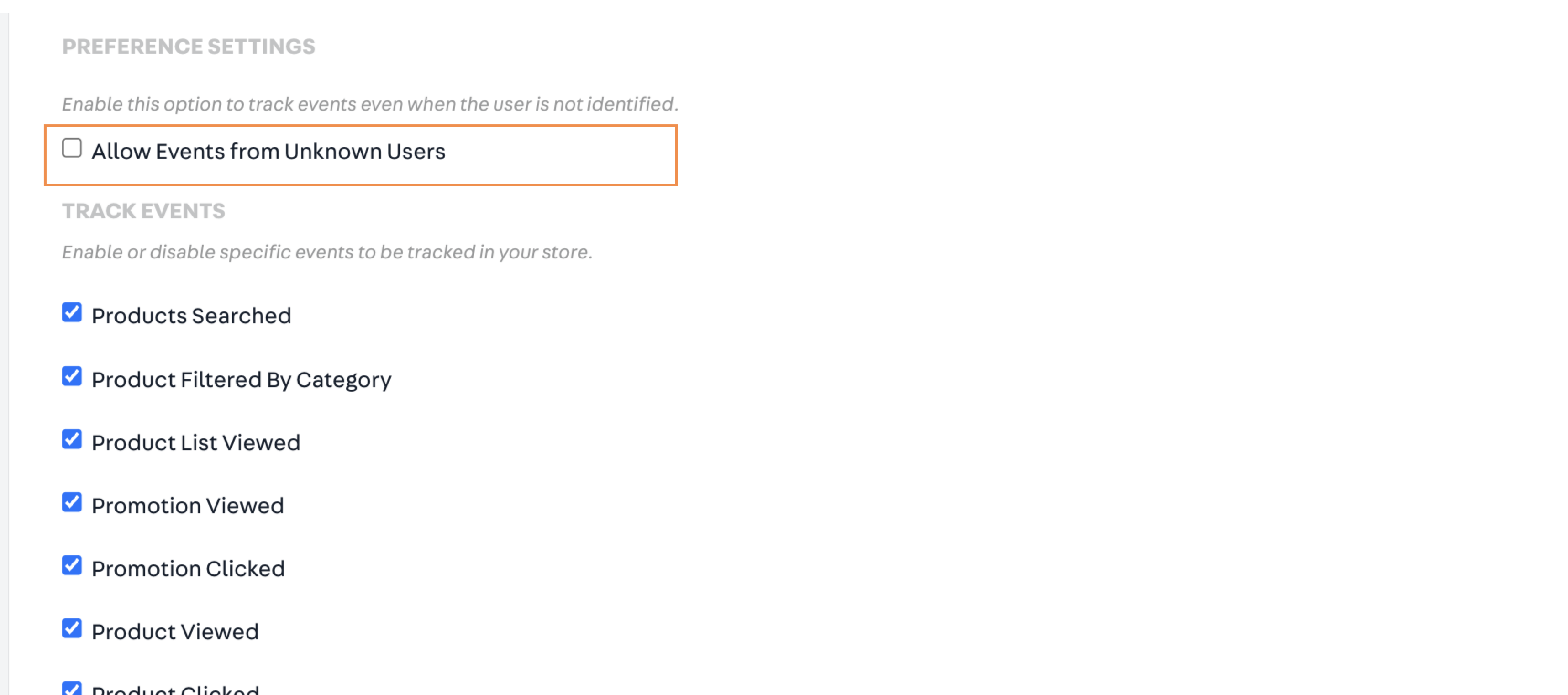
Track Unknown Users
Charged Event Configuration
When enabled, the Charged event is sent only after payment is approved. When disabled, the Charged event is sent when the customer places the order.
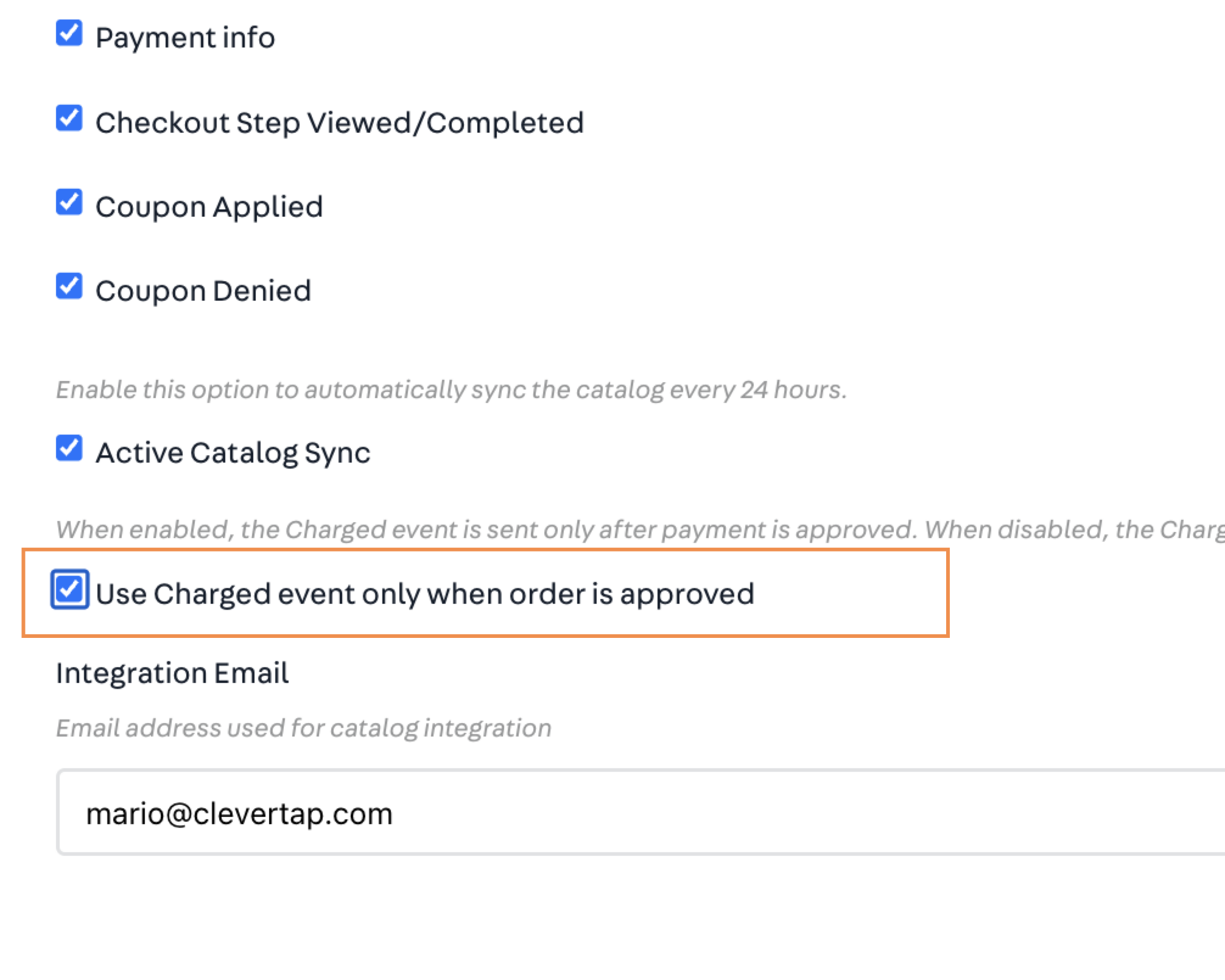
Use the Charged event
User Profile Data
VTEX passes the user data as profile properties to CleverTap. The following table displays all profile properties supported by the CleverTap app:
| User Property | Description | Example |
|---|---|---|
| The customer's email address. | [email protected] | |
| First Name | The customer's first name. | Clark |
| Last Name | The customer's last name. | Kent |
| Phone | The customer's mobile number. It must include the country code. For example, +1 for the United States or +55 for Brazil. | +5562999999999 |
| DOB | The customer's date of birth. | 1997-05-28T19:44:10.160Z |
| Tags | The list of tags associated with the customer. | Premium Users |
| City | The customer's city. | Goiania |
| State | The customer's state or region. | Goiás |
| Country | The customer's country. | Brazil |
| Last Login | The date and time the customer last logged in to the store. | — |
| Orders Count | The total number of orders placed by the customer. | 10 |
| Total Spent | The total amount spent by the customer across all orders. | 4500.85 |
| Currency | The currency associated with the customer's purchases. | USD |
| Email Marketing Consent | Records the customer's consent status for receiving marketing communications via Email. | — |
| SMS Marketing Consent | Records the customer's consent status for receiving marketing communications via SMS. | — |
| MSG-email | Indicates whether the customer has subscribed to email notifications. | TRUE |
| MSG-push | Indicates whether the customer has subscribed to push notifications. | TRUE |
| MSG-sms | Indicates whether the customer has subscribed to SMS notifications. | FALSE |
| MSG-whatsapp | Indicates whether the customer has subscribed to WhatsApp notifications. | FALSE |
| Newsletter Subscribed | Records whether the customer has subscribed to the store newsletter. | TRUE |
| Last Order ID | The order ID of the most recent order placed by the customer. | — |
| Tax Exempt | Indicates whether the customer is exempt from taxes. | — |
| Wishlist IDs | An array of product IDs currently saved in the customer's wishlist. | ["id1", "id2"] |
| VTEX Cart IDs | An array of product IDs currently in the customer's active cart. | ["id1", "id2"] |
Active Catalog Sync
Select to sync your product catalog with CleverTap. If you enable the Active Catalog Sync, the product catalog will sync with your account every 24 hours.
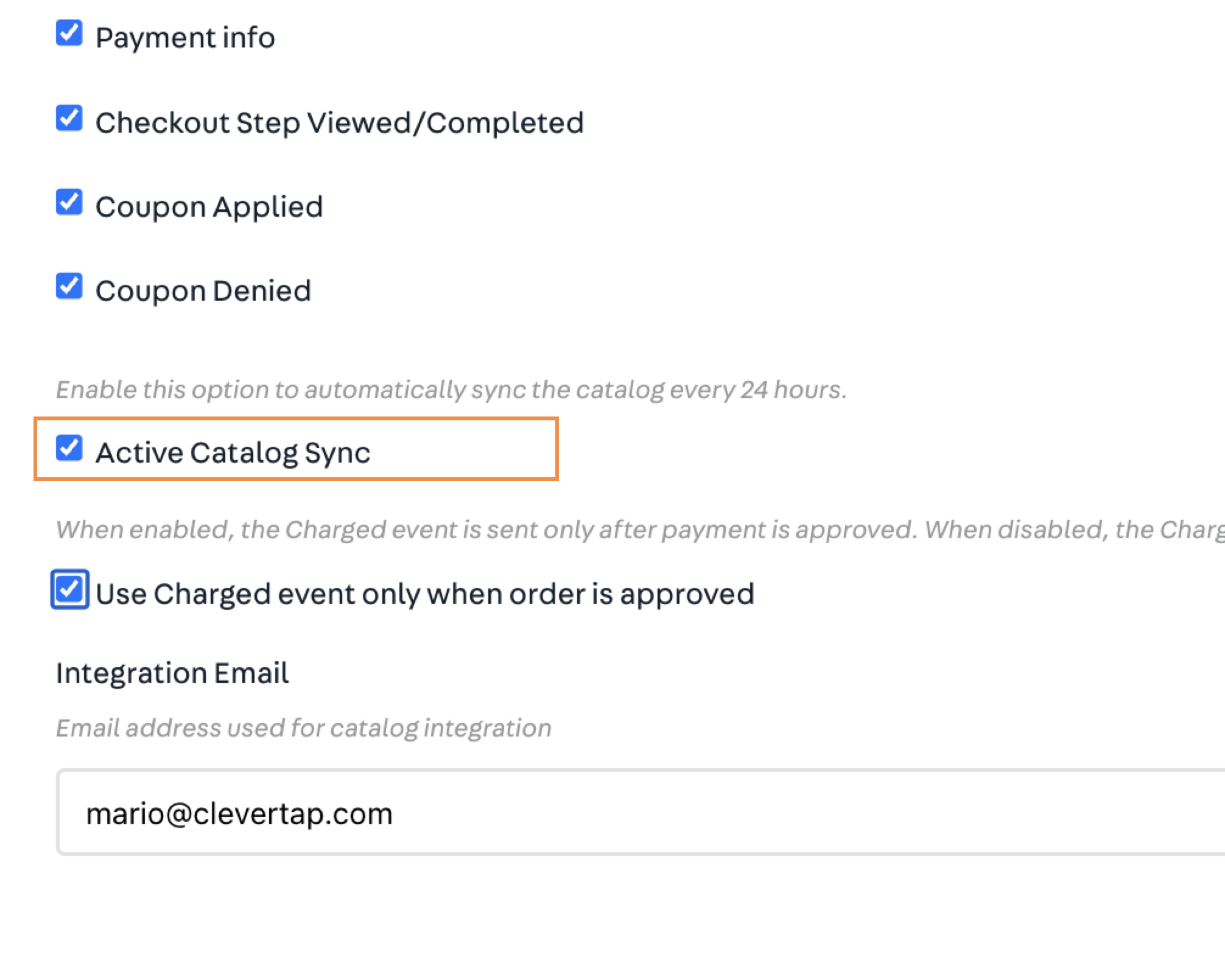
Sync Product Catalog
Updated about 3 hours ago