
Create Recommendation Strategy
Learn how to create recommendation strategies that show relevant items from your catalog across different user experiences.
Overview
A recommendation strategy controls which catalog items are shown to each user and in what order, based on signals such as user activity, item popularity, or content attributes. It connects your catalog to your campaigns, sources eligible items, and delivers personalized recommendations through engagement. Once created, a strategy can be reused across multiple campaigns.
When you create a strategy, you define:
- Which strategy type to use
- Which Catalog is used to generate product recommendations
- How user activity links to catalog items based on the strategy type selected
This allows you to define recommendation logic once and reuse it across multiple engagements.
Prerequisites
Ensure the following are in place before creating a strategy:
- Catalog: At least one Catalog must exist in your account with all required attributes, such as Item ID, Name, Description, Category, Genre, Language, Price, and Brand or tags. If no suitable catalog exists, you can create one during setup. For more information, refer to Catalog.
- Event Tracking: If your strategy depends on user behavior, ensure relevant events are tracked in your project, such as
Product Viewed,Added to Cart,Charged, orVideo Viewed. - Identifier Mapping: Events and catalog data must share a common identifier so the system can link user actions to items. For example, if an event Product Viewed includes a
Product IDproperty, its value must match the corresponding item identifier in the Catalog.
Recommendation Strategies Workflow
Every recommendation strategy is built on the following three layers that work together in sequence:
| Layer | Description | Decision it Drives |
|---|---|---|
| Catalog | Provides the pool of items available for recommendation | What items to generate recommendations on |
| Rules | Defines item eligibility and behavioral signals | Which user actions matter? |
| Strategy logic | Selects items for generating recommendations and ranks them per relevance | Which items must be recommended as part of personalization |
These layers feed into the recommendation engine, which processes them at runtime.
OTT: Recommend Content Based on Past Viewing Activity
The following example shows each layer of a strategy configured to recommend content to users based on their recent viewing activity:
| Layer | Configuration |
|---|---|
| Catalog | Movies Catalog |
| Strategy | Based on what you viewed |
| Event rule | video_viewed in the last 7 days |
| Mapping | video_viewed. Content ID maps to Catalog identity |
| Result | Recommends content based on recent viewing activity |
E-Commerce: Recommend Products Based on Viewing Activity
The following example walks through each layer of a strategy configured to recommend products based on a user's recent browsing activity:
| Layer | Configuration |
|---|---|
| Catalog | Products catalog |
| Strategy | Based on what you viewed |
| Event rule | Product Viewed in the last 7 days |
| Mapping | Product Viewed. Product ID maps to Catalog identity |
| Result | Recommends relevant products based on recent browsing behavior |
Subscription: Recommend Popular Articles
The following example shows each layer of a strategy configured to recommend content to users based on the popular articles:
| Layer | Configuration |
|---|---|
| Catalog | Articles catalog |
| Strategy | Popular |
| Event rule | article_read in the last 7 days |
| Mapping | article_read.Article ID maps to Catalog identity |
| Result | Recommends articles that have been read the most in the last 7 days |
Create Strategy
Creating a strategy involves the following three key steps:
Select Strategy Type
Choose a strategy type that matches your use case. Each type uses different signals to generate recommendations, such as what a user has recently viewed, what is trending across your audience, or what is similar to items they have engaged with.
You can search by name or browse available options. For a detailed comparison to help you pick the right type, refer to Choose Right Strategy.
Configure Data Source and Recommendation Rules
This step defines where the system sources items from and what user behavior it should consider when generating recommendations. You select a catalog, set rules based on user activity, such as views, add to carts, or purchases, and specify which event data should be used to match user actions to catalog items.
Select Catalog
Select a catalog from the dropdown. A preview table displays sample items and attributes. If no suitable catalog is available, you can create one directly from this step. For more information, refer to Create Catalog.
Define Criteria
Criteria determine which items qualify for recommendation based on user activity. Each criteria block includes:
- Event name: The user action to track (for example, Product Viewed, Added to Cart, Video Viewed.
- Time window: How far back the system looks (for example, last 7 days)
- (Optional) Filters: narrow the event scope by event properties.
For example, CRITERIA A: Did Video Viewed in the last 7 days.
You can define multiple criteria blocks. For more information on combining criteria, refer to Filter Rules.
Map Catalog and Event Properties
Events and catalog data must share a common identifier so the system can link user actions to items. For each event defined in your criteria, use the dropdown to map its properties to the corresponding catalog identifier.
For example, if a Video Viewed event includes a show_id property, map it to the catalog column that holds the same identifier value so the system can correctly attribute that interaction to a catalog item.
| Event | Event Property | Catalog Identifier |
|---|---|---|
| Video Viewed | show_id | Content ID |
| Product Viewed | product_id | Item ID |
The following image shows how to create a Recommendation Strategy:
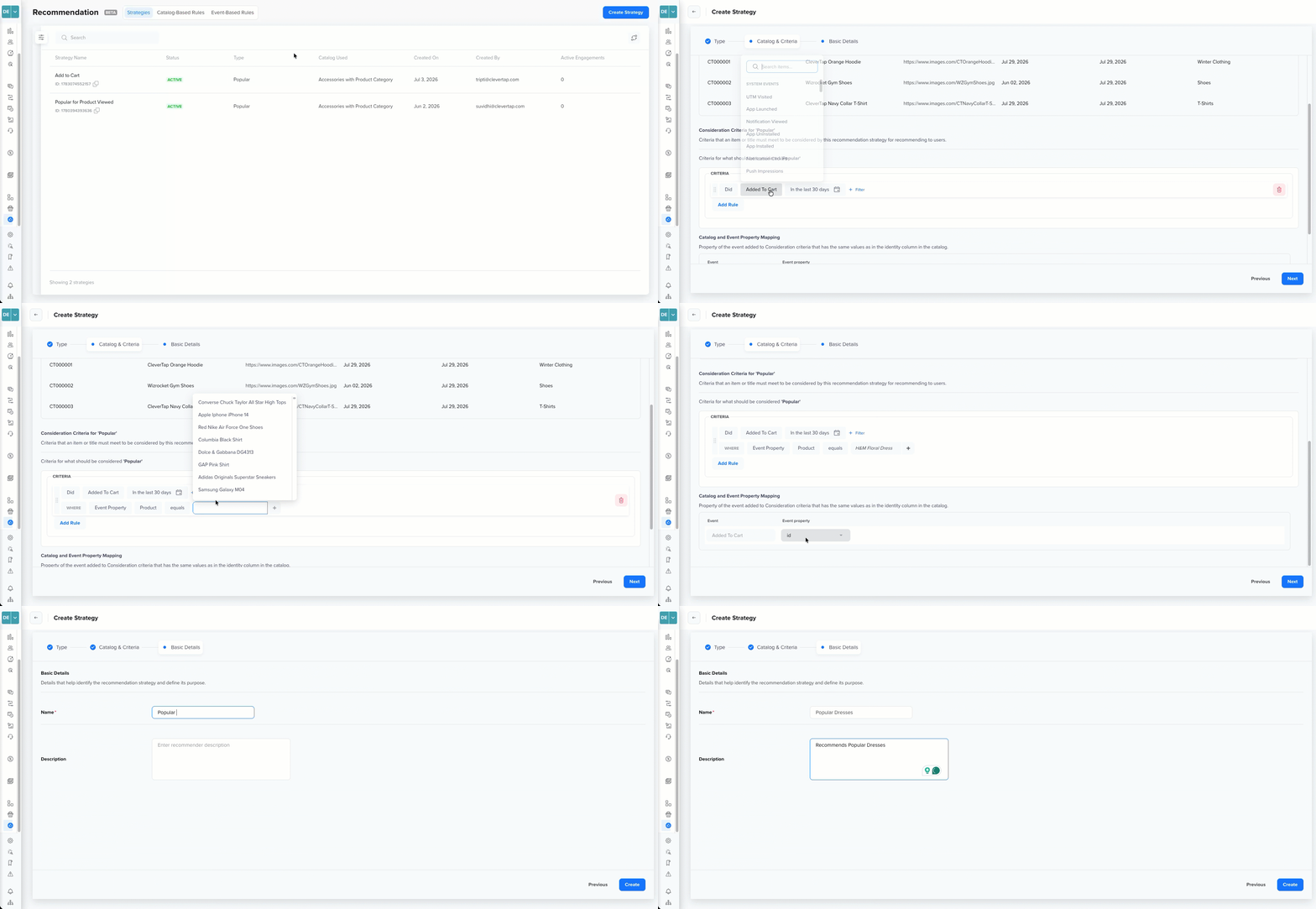
Create a Recommendation Strategy
Add Basic Details
Enter the following details and click Create to save the strategy:
| Field | Description |
|---|---|
| Name | Use a clear and descriptive name that reflects the use case, Catalog, and logic. For example, Popular Shoes by Purchases, Trending Hindi Movies, Viewed Electronics Last 7 Days, and so on. |
| Description | Add additional context if needed. |
Recommendation Strategy States
A strategy moves through a defined set of states from the moment it is created until it is deleted. Understanding these states helps you track what a strategy is doing and take the right action at each stage.
Strategy Management ConstraintsA strategy cannot be deleted while it is Active, it must be stopped first. Restarting a Stopped strategy does not reset its interaction data; it resumes serving recommendations based on existing data. A strategy in the Error state can be restarted directly without stopping first.
The following image shows a strategy moving through five states, from creation to deletion:
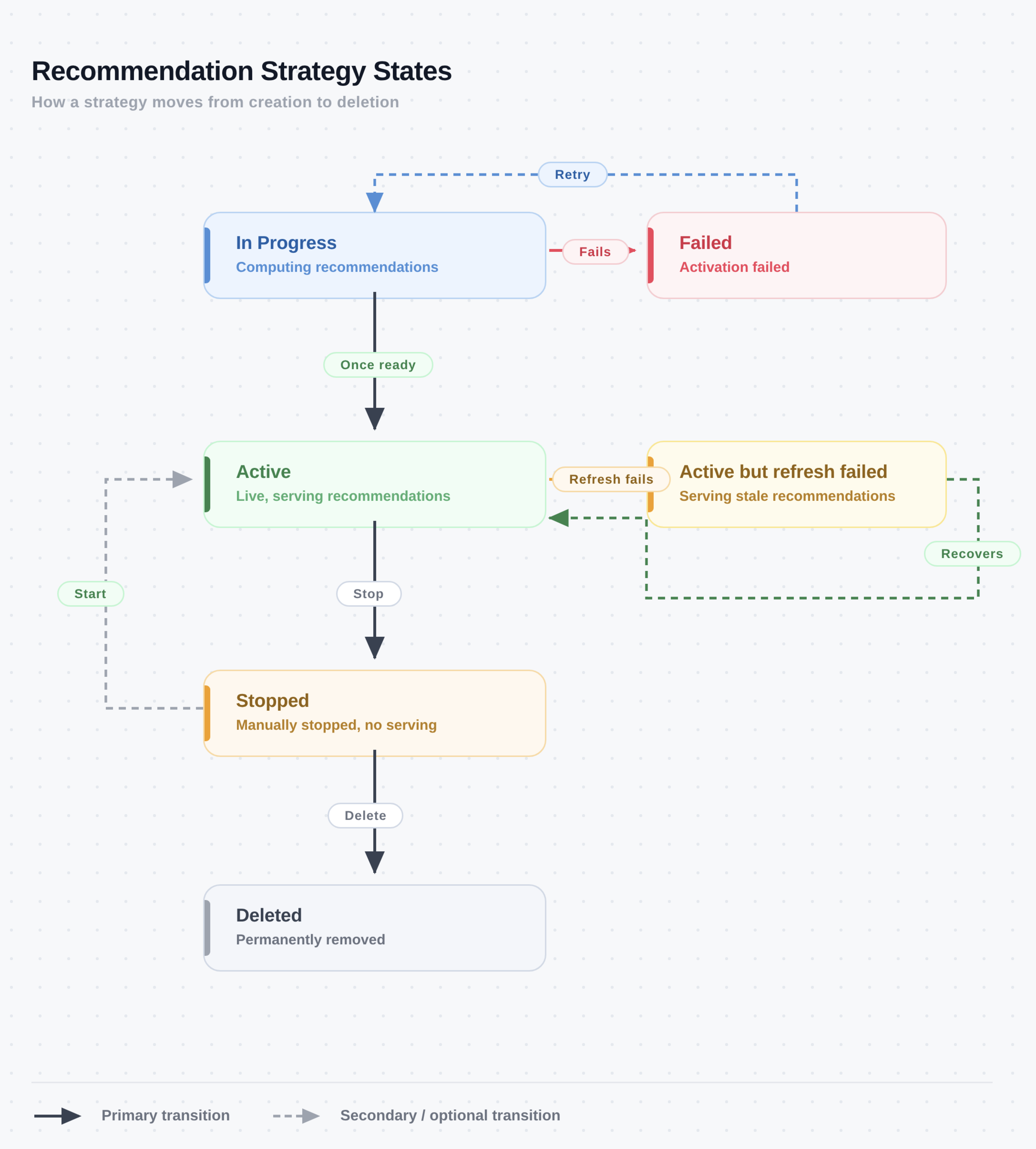
Recommendation Strategy States
The following table describes each strategy state:
| State | Description |
|---|---|
| In Progress | The system is computing recommendations for the first time. No recommendations are served until this process completes. |
| Active | The strategy is live and actively serving recommendations. |
| Active But Refresh Failed | The strategy is still serving recommendations based on its last successful run, but the most recent scheduled refresh failed. Recommendations may be stale. Monitor the next refresh cycle to confirm recovery, or stop and restart the strategy to trigger an immediate retry. |
| Failed | Activation failed. The strategy could not reach the Active state, typically due to a misconfigured catalog mapping or event rule. Review the error details and click Start to retry without losing your configuration. |
| Stopped | The strategy has been manually paused. Recommendations are no longer served. Click Start to restart, the strategy re-enters the In Progress state and returns to Active once processing completes. |
| Deleted | The strategy has been removed. A strategy can only be deleted from the Stopped state. Deletion cannot be undone. |
Manage Recommendation Strategies
Go to the Strategies tab to view and manage all recommendation strategies present in your account.
The strategies list displays the following information for each strategy:
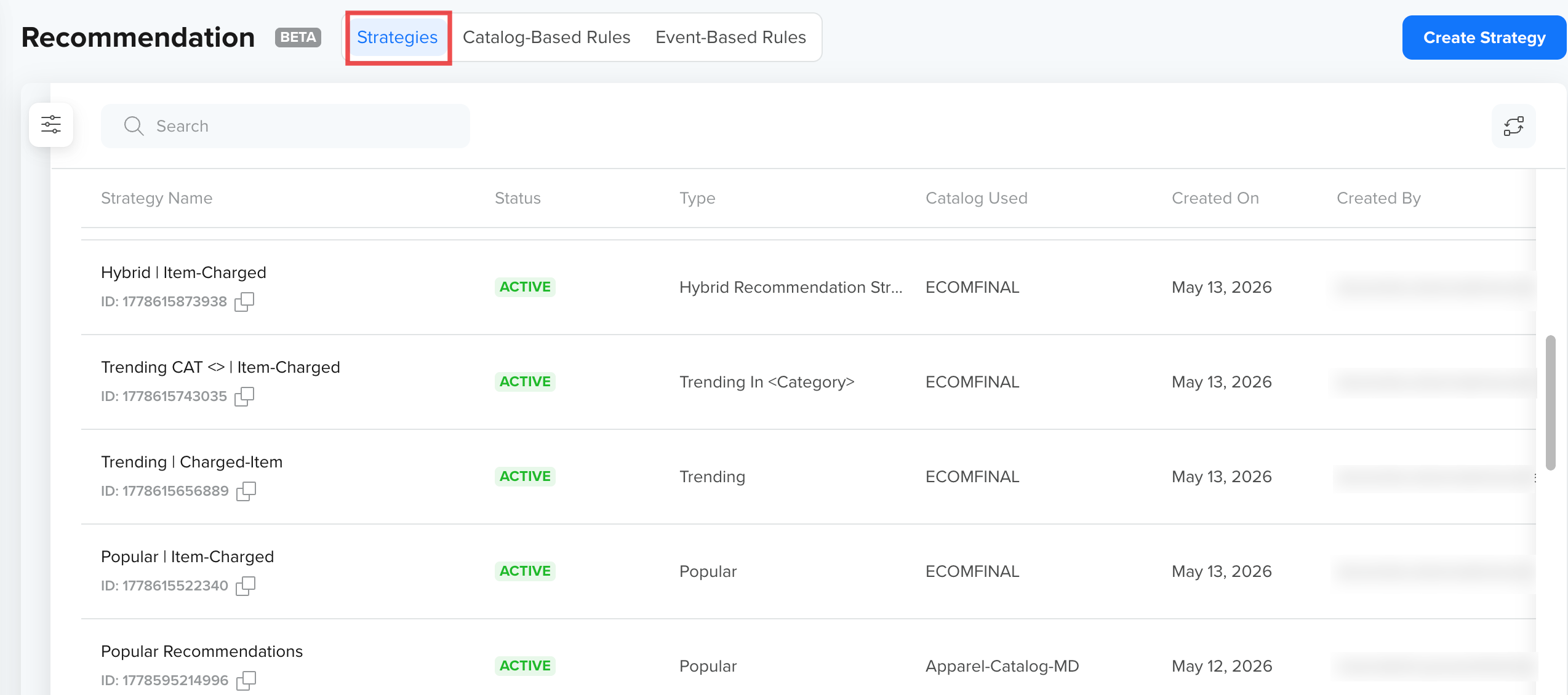
Strategies List
| Column | Description |
|---|---|
| Name | Strategy name and ID. Click the copy icon to copy the strategy ID. |
| Status | Current state of the strategy, displayed as a color-coded badge. |
| Algorithms | Recommendation algorithm types used by the strategy. |
| Catalog | The catalog on which the strategy is built. |
| Created On | Date the strategy was created. |
| Created By | Team member who created the strategy. |
| Engagements | Number of active engagements using this strategy. Click the count to view a list of all engagements. |
Each strategy has the following actions available:
| Action | Description | Available When |
|---|---|---|
| Clone | Creates a copy of the strategy with the same configuration. | Always |
| Open in new tab | Opens the strategy detail view in a new browser tab. | Always |
| Start | Activates the strategy. It re-enters the In Progress state and moves to Active once processing completes. | Stopped, Failed |
| Stop | Pauses the strategy. Recommendations are no longer served. If the strategy is used during engagements, a confirmation dialog is displayed before your action. | Active, Active But Refresh Failed, In Progress |
| Delete | Permanently removes the strategy. This action cannot be undone. | Stopped |
Filter Strategies
Click the  icon to open the Filters panel. You can filter by:
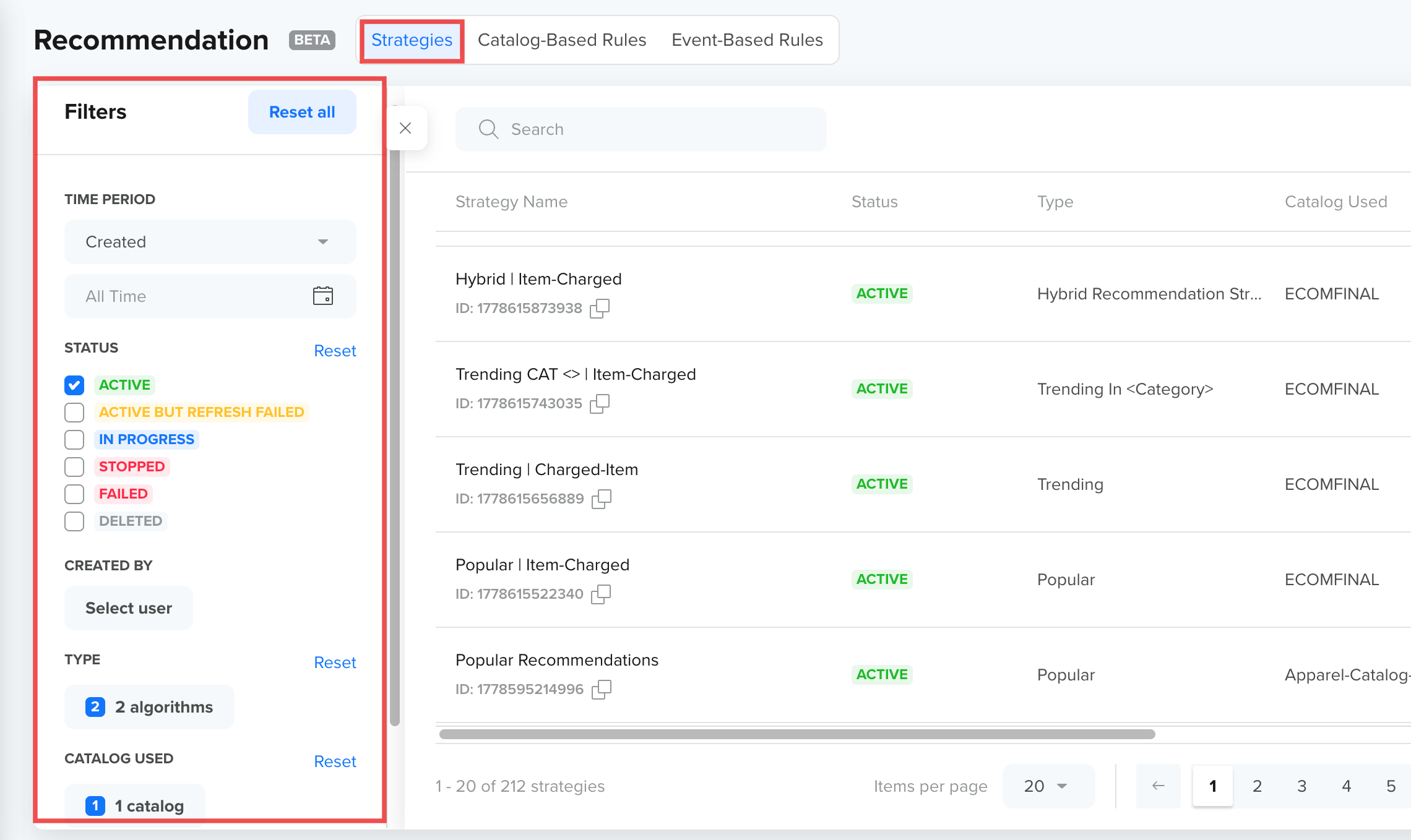
Strategies- Filters
| Type | Description |
|---|---|
| TIME PERIOD | Filter by creation date. Defaults to All Time. |
| STATUS | Filter by one or more strategy states. |
| CREATED BY | Filter by the team member who created the strategy. |
| TYPE | Filter by algorithm type. Use the search bar or select all available options. |
| CATALOG USED | Filter by the Catalog used to build the strategy. |
Best Practices
- Always validate catalog selection before defining rules so that the correct Catalog is used for generating product recommendations
- Ensure event-to-catalog mapping is correct for activity-based strategies
- Use descriptive strategy names so they are easy to identify when reusing across engagements
Updated about 1 month ago