
Product Catalog
Learn how CleverTap’s Product Catalog enriches incomplete catalogs with AI to power personalized experiences and recommendations.
Overview
Product Catalog in CleverTap enables customers to upload and manage product data that powers personalization and recommendations.
However, uploaded catalogs are often incomplete and lack category-specific attributes such as color, size or length, material, capacity, and other relevant metadata. These gaps limit the ability to deliver true 1:1 personalization and reduce the effectiveness of product recommendations, including scenarios with sparse behavioral or catalog data.
For example, consider an e-commerce catalog item uploaded with the following data:
- Title: Men’s Running Shoes
- Description: Lightweight shoes designed for daily runs
- Image: Product image showing a blue running shoe
The catalog item does not explicitly include structured attributes such as color, shoe type, gender, or usage.
AvailabilityProduct Catalog is included on the Pro and Ultimate plans and available as an add-on on the Core plan. To access the feature, contact your Customer Success Manager.
Catalog is available on all plans.
Use Cases
Here are some of the industry-specific personalization and recommendation use cases that Catalogs feature enables by filling missing attributes, standardizing catalog data, and adapting content for relevance and scale.
E-commerce catalogs often lack structured attributes needed for accurate filtering, targeting, and similarity matching. The Catalog feature automatically derives attributes such as brand, color, length, and gender from product text and images.
This enables use cases such as:
- Personalized product recommendations based on user preferences (for example, color or style affinity).
- Improved product discovery through attribute-based filtering.
- Adapted product images and descriptions optimized for different engagement channels and user personas
Financial product catalogs may not explicitly classify offerings by risk or suitability. This feature helps derive and standardize attributes such as risk category.
This enables:
- Personalized product recommendations aligned to a user’s risk profile.
- Targeted campaigns for low-risk or high-risk financial products.
- Better compliance-aware segmentation and messaging.
Food catalogs often lack consistent classification across cuisines, meal types, or dietary preferences. This feature identifies attributes such as cuisine, meal type, and dish category.
This enables:
- Personalized meal and restaurant recommendations based on user preferences.
- Improved discovery for new or less-ordered items.
- Adapted images and descriptions optimized for different channels and regions
Gaming catalogs may not explicitly tag games by genre, audience, or age segment. This feature extracts attributes such as game type, age segment, and gender relevance.
This enables:
- Personalized game recommendations and promotions.
- Audience-specific onboarding and engagement journeys.
- Discovery of similar games based on enriched attributes.
Subscription-based platforms often struggle to tag content consistently at scale. This feature derives attributes such as article type, age segment, and audience relevance.
This enables:
- Personalized content recommendations.
- Audience-specific newsletters and campaigns.
- Better discovery of relevant content across the catalog.
Product Catalogs Listing
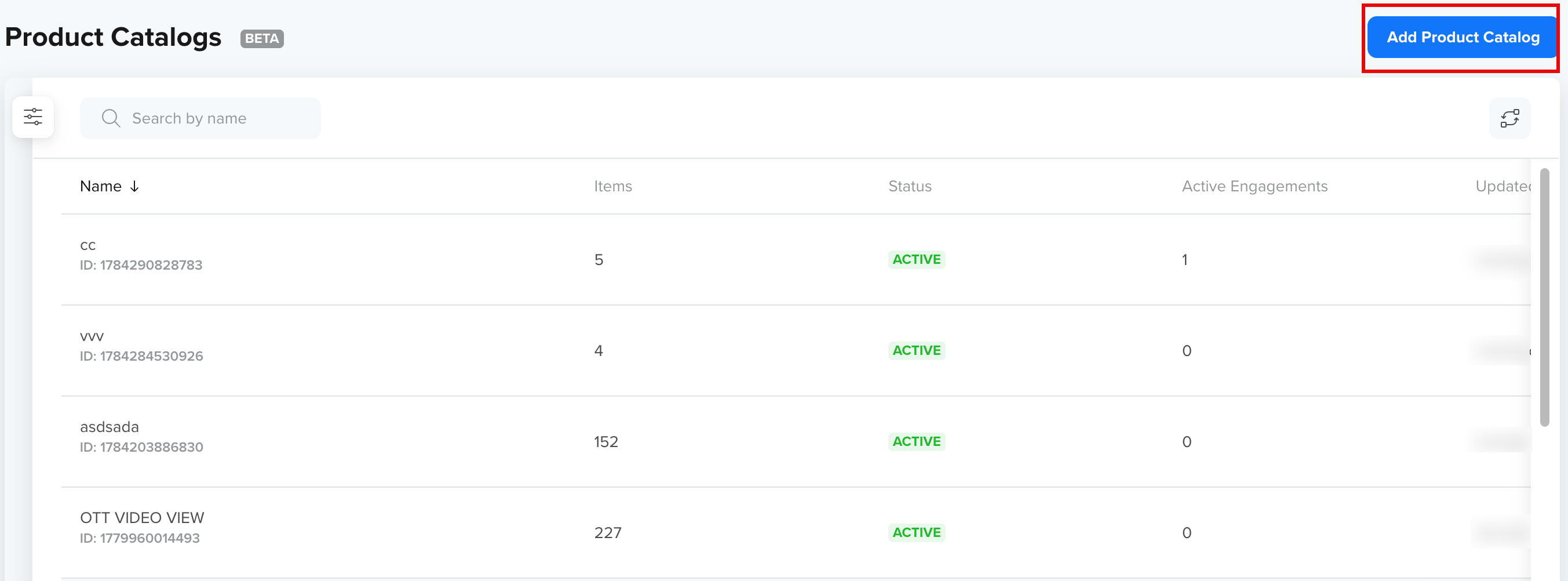
The Product Catalogs listing page displays every catalog in the account. Each catalog appears as a row showing its name and system-generated ID, the number of items it contains, its status, how many live engagements use it, and who last updated it and when. This view provides a central place to monitor and manage catalogs and quickly understand their current state.
Use the search bar to find a specific catalog, and scroll through the list to review multiple catalogs. The Add Catalog button lets you create a new catalog. A system-generated ID is assigned to each catalog when it is created.
The following image shows the Catalog listing page:
Product Catalog Listing
Filters on Catalogs Listing
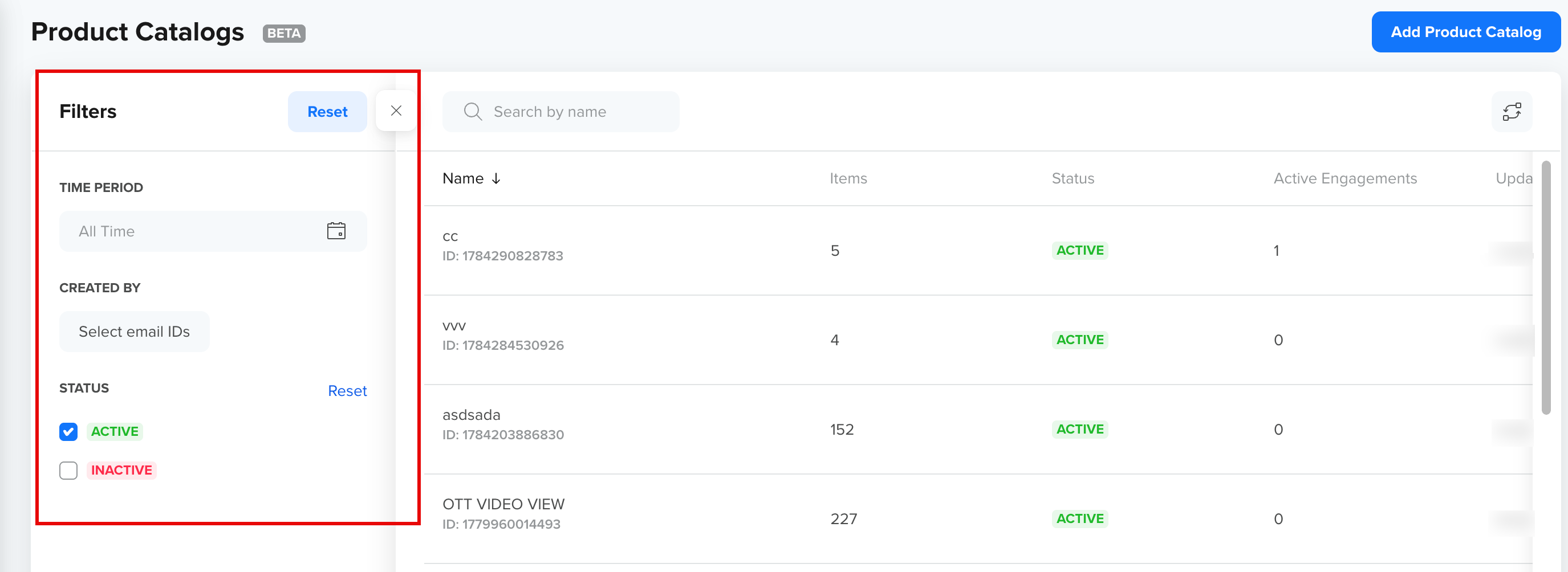
The Filters panel helps narrow down the catalogs displayed in the list.
| Filter | Description |
|---|---|
| Time period | Restrict to catalogs created within a date range. Choose a preset, such as All Time, or set a custom range. |
| Created by | Show catalogs created by specific users, selected by email ID. |
| Status | Filter by catalog status:
|
NoteA newly created catalog is INACTIVE. A catalog becomes ACTIVE only after an upload completes successfully. If a catalog you just created does not appear in a campaign's catalog picker, check its status here and review its Feeds tab for a failed upload.
Filters make it easier to locate specific catalogs, especially when managing a large number of entries.
The following image shows the available Filters for Product Catalog Listing:
Filters on Product Catalog Listing
Edit Columns
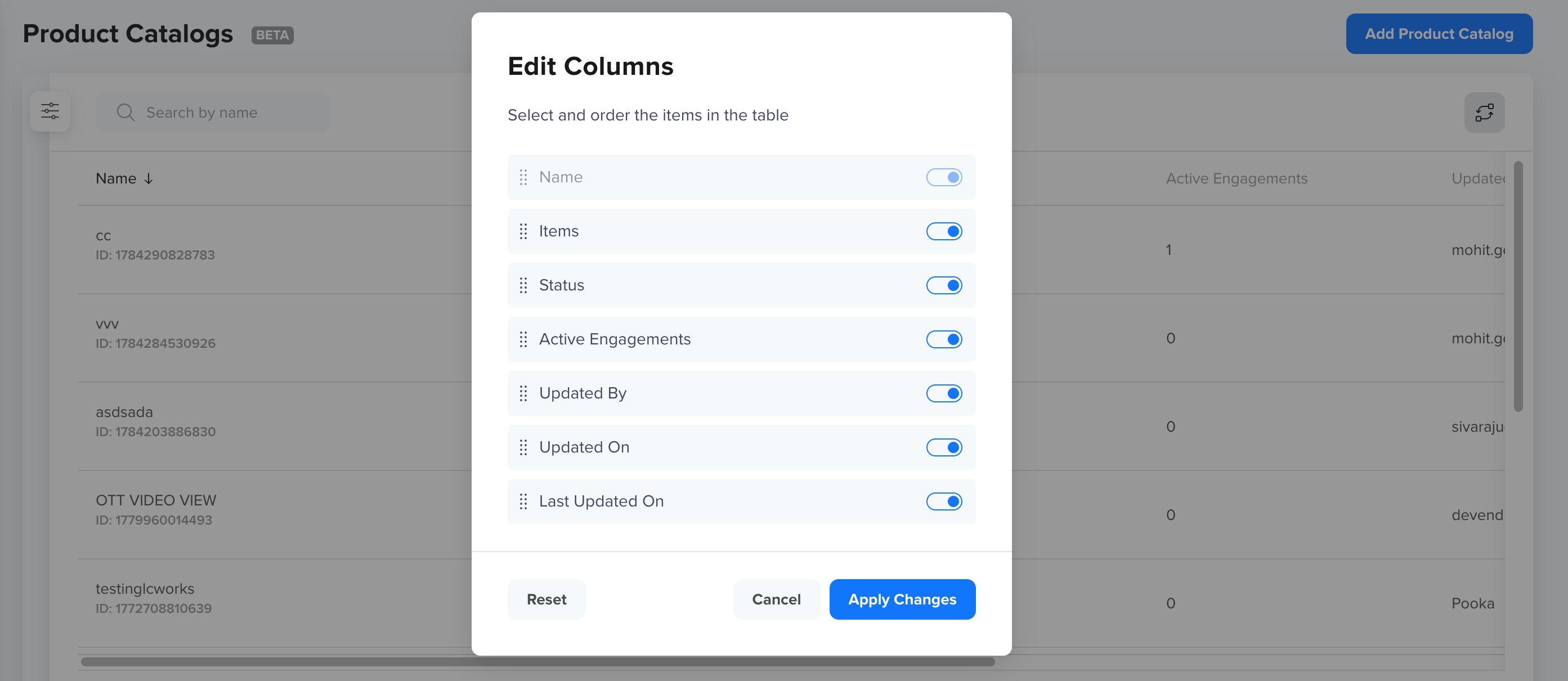
The Edit Columns panel allows you to control how the catalogs table is displayed. You can select which columns appear in the table and reorder them using drag handles.
Name always appears and cannot be hidden. The following columns can be shown, hidden, or reordered: Items, Status, Active Engagements, Updated by, Updated on, and Last Updated on. Customizing columns helps you focus on the information that matters most to your workflow.
The following image shows the Edit Columns panel to show or hide the column in Catalog Listing:
Edit Columns
Delete a Catalog
To delete a catalog, open it and use the delete action. Deleting a catalog:
- Sets its status to DELETED and removes it from the Product Catalog listing page, but it can be seen if the deleted filter.
- Disables any recurring sync on it, so no further scheduled feed runs are created.
- Releases its name, so you can create a new catalog with the same name afterward.
Deletion is blocked while live engagements use the catalogIf any live campaign or journey references the catalog, the delete is refused and CleverTap lists the blocking engagements. Stop those engagements, or remove the catalog block from them, then retry. The Active Engagements column on the listing page tells you in advance which catalogs are in use.
Updated about 1 month ago