
Recommendations
Learn how to get started with setting up recommendations and personalizing engagement using them effectively
Overview
CleverTap Recommendations automatically surfaces the most relevant products, videos, articles, or items to each user at the right moment. Instead of manually curating product lists or applying static rules, Recommendations uses behavioral signals and product attributes to deliver dynamic, context-aware suggestions across every channel, including Push, Email, SMS, In-app, and Webhooks.
At its core, the feature works by connecting two data sources:
- Your Catalog: the products, shows, or other items you want users to discover
- User Behavior: events such as views, clicks, and purchases that signal what each user finds relevant
Together, these inputs improve the relevance of recommendations by incorporating context, timing, and user behavior.
The following image illustrates how Recommendations works, from the inputs that feed the engine to the ranked results delivered across every channel, and how the fallback strategy ensures every user sees a recommendation:
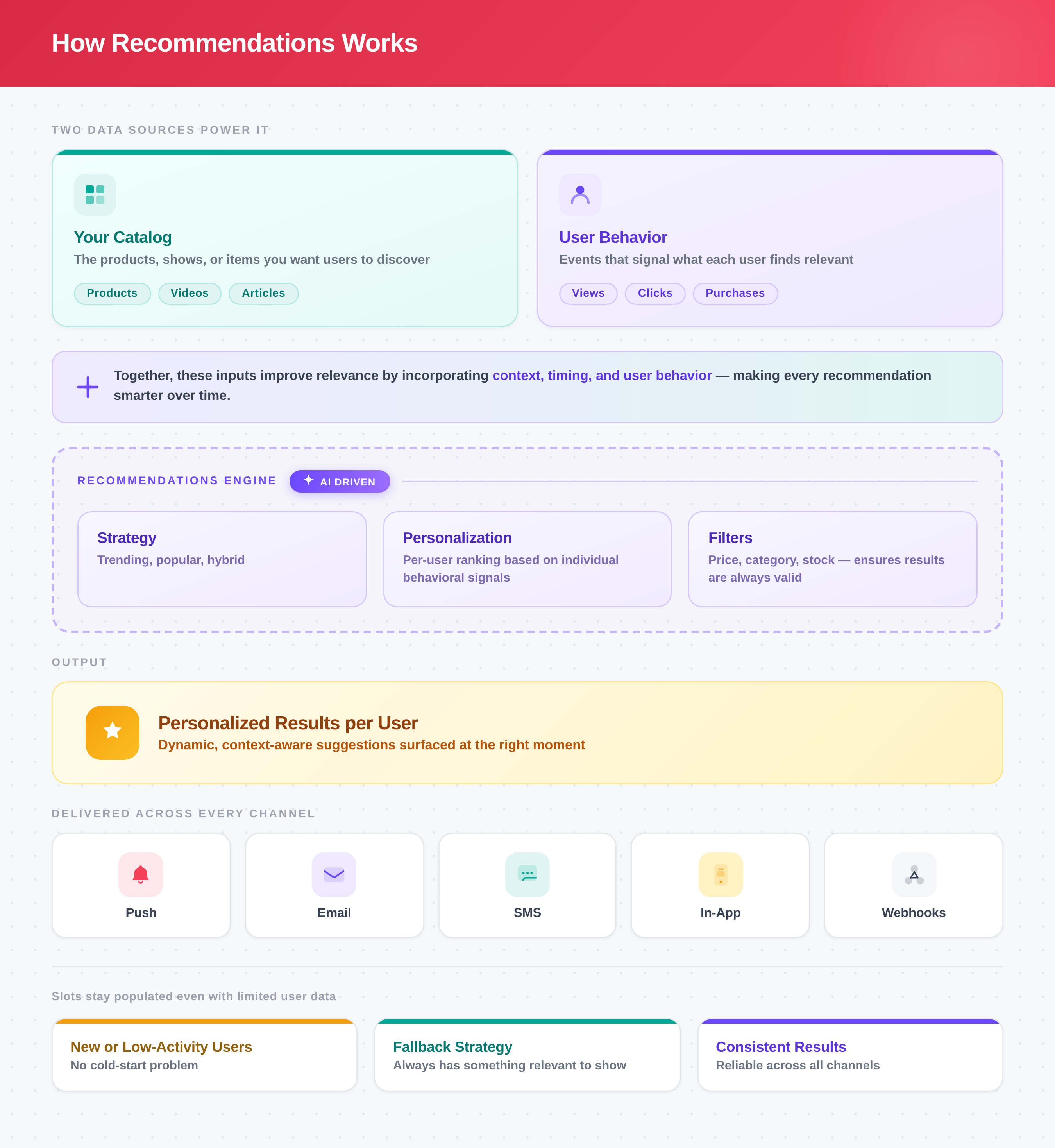
Recommendations Workflow
AvailabilityThe new and enhanced Recommendations feature is available only on the Ultimate plan. Accounts on other plans continue to use the existing Recommendations. To access the feature, contact your Customer Success Manager.
Challenges Recommendations Solve
As catalogs and user bases grow, it becomes harder to consistently deliver relevant content experiences. Recommendation systems help address this by using user activity and catalog data to determine which items are most relevant in a given context.
Common challenges include the following:
Large Catalogs with Limited Discoverability
When applications contain hundreds or thousands of items, users may struggle to identify relevant content. Recommendation systems help surface items based on user behavior, item attributes, and interaction patterns, improving content discoverability across the catalog.
One-Size-Fits-All User Experiences
Different users interact with products differently depending on their interests, activity history, and lifecycle stage. Recommendation systems enable applications to present content dynamically rather than showing the same recommendations to every user.
Underutilized Event-Based Data
User interactions such as views, clicks, purchases, and watch history provide signals about user preferences. Recommendation systems use these signals to continuously refine and personalize the content shown to users over time.
Key Concepts
-
Strategy: A pre-configured recommendation setup that defines which algorithm to use, which events to track, and how to map event properties to catalog items. A strategy is created once and reused across multiple campaigns.
CleverTap provides a set of out-of-the-box strategies, including Popular, Trending, Based on What You Viewed, More Like These, and others, each suited to a different recommendation goal. You can use these directly or fine-tune them to your use case by configuring the interaction event, time window, filters, and catalog mapping.
For example, a streaming platform might start with the out-of-the-box Popular strategy and configure it to count only
video_playedevents from the last 7 days, filtered to a specific genre, then reuse that same strategy across a homepage banner, a weekly digest email, and a push notification campaign. -
Algorithm: The underlying computational method that determines how catalog items are ranked and selected for each user. Algorithms vary in the signals they use; some rank by overall popularity across all users, others factor in an individual user's interaction history, and others detect patterns across users with similar behavior. For example, the Popular algorithm ranks items by total view count across all users, surfacing the most-viewed item first. Each Strategy is built on a specific algorithm you choose when creating or customizing it.
-
Rules: Rules let you define reusable conditions based on catalog attributes, such as
in_stock= Y. These rules can then be applied as filters during recommendation personalization. Two types of Rules-based filters are supported:- Catalog-based Rules: Based on item attributes such as category or price. For example, a catalog filter can restrict recommendations to in-stock products only, so a user never sees an item they cannot buy.
- Events-based Rules: Based on user activity, such as
video_played.
You can use them either as Include filters to show only items that match the rule, or as Exclude filters to remove such items from the recommendations. For example, if you create a rule wherein_stock = Y, you can use it as an Include filter to recommend only products that are in stock.
-
Fallback Strategy: A secondary strategy that activates when the primary strategy cannot generate enough results. It is configured during engagement personalization. For example, if a new user has no viewing history and the Hybrid strategy returns no results, the fallback Popular strategy ensures popular recommendations are still served to the user, preventing the experience from breaking.
Recommendations Workflow
Recommendations combine your catalog, user behavior, and a strategy you define to deliver the right items at the right time across the right channels. The process has the following four key steps:
-
Connect Catalog: Ingest your item catalog into CleverTap (supports CSV, API sync, or Google Sheets sync). Each item, whether a product, video, article, or any other entity, becomes a candidate for recommendation. Catalog attributes such as category, price, availability, and custom fields are used to filter items appropriately. For more information, refer to Product Catalog.
-
Set Up Strategy: Select a recommendation strategy that matches your goal. The strategy determines how items are ranked and selected for each user. Define the interaction event (for example, Product Viewed), configure the lookback period, and map the event property that identifies the product to the catalog's Identity field. The strategy begins processing once it is activated. Saving the strategy does not make it live; you must activate it after saving. The strategy is ready to serve once it reaches Active status.
-
Personalize engagements: Embed recommendations directly into your campaigns across email, push notifications, in-app messages, and your website or mobile app. Select a strategy, apply filters, and use liquid tags to inject personalized item attributes into your message content. For more information on setting up recommendation personalization in a campaign, refer to Personalize Engagements using Recommendations.
- Configure Rules: Apply catalog-based filters (for example, only in-stock items or items within a specific price range) or event-based filters (for example, exclude items the user has already purchased) to control which items are eligible. For more information, refer to Filter Rules.
- Configure Fallback Strategy: Configure a fallback that activates when the primary strategy cannot generate enough results, for example, when a user has insufficient interaction data. For more information on available strategies and how to configure them, refer to Recommendation Strategies.
Once your catalog is connected and a strategy is active, the same strategy can power personalization across Push Notifications, Email, In-App, and other channels simultaneously. Configure it once and reuse it across any number of campaigns. To set up your first recommendation, start by ingesting your items with Product Catalog, then follow Recommendation Strategies to configure and activate a strategy.
Updated 5 days ago