
Nested Objects in Custom Event Properties
Learn how to send structured metadata within custom events using nested objects to group related event attributes such as order details or product information.
Overview
Nested objects allow you to send structured metadata within custom event properties.
For more information, refer to Nested Objects.
Use Cases
Nested event properties help capture structured event data.
Healthcare
Send medication reminders or follow-up test notifications based on nested appointment details. This reduces missed follow-ups and improves patient compliance. For example, trigger a reminder when Appointment.Prescription.MedicationName exists and Appointment.Prescription.NextDoseTime is approaching, or send a follow-up notification when Appointment.Tests.FollowUpDate is scheduled.
Travel & Hospitality
Trigger personalized follow-ups based on booking preferences such as room type, meal plan, or service requests. This improves the guest experience and reduces booking cancellations by confirming preferences proactively. For example, send a confirmation message when Booking.Preferences.RoomType is Suite, and remind guests of selected services when Booking.Preferences.Services.Spa is true.
Send Nested Event Properties
Nested Objects in custom event properties follow the same structure and validation rules as Nested Objects in user properties. Event properties follow the same schema enforcement rules to ensure consistent ingestion and prevent failures. You can send nested event properties through CleverTap SDKs or APIs.
The following sample payload sends an event with nested course selection data:
{
  "Courses_In_Cart": [
    {
      "Id": 10,
      "Name": "Greenfield Institute of Technology",
      "Courses": [
        {
          "Id": 101,
          "Name": "B.Tech in Computer Science and Engineering (Slot-A)"
        }
      ]
    },
    {
      "Id": 12,
      "Name": "Sunrise University, Jaipur",
      "Courses": [
        {
          "Id": 102,
          "Name": "B.Tech in Computer Science and Engineering"
        },
        {
          "Id": 103,
          "Name": "B.E. in Computer Science and Engineering"
        }
      ]
    }
  ],
  "Amount": 3.0,
  "Payment_From": "CAF Version2"
}
Event Schema Behavior
When you send nested event properties, CleverTap processes the structure and stores nested attributes within the event schema.
These properties can then be used in analytics and campaign targeting workflows.
Use Nested Objects across Platforms
After ingestion, Nested Objects for custom event properties are available across CleverTap, including segmentation filters and campaign personalization.
- Segment Builder
Nested fields from events can also be used as filters inside segmentation conditions.
The following image shows how nested fields appear for event properties and can be used to create filters in the Segment Builder:
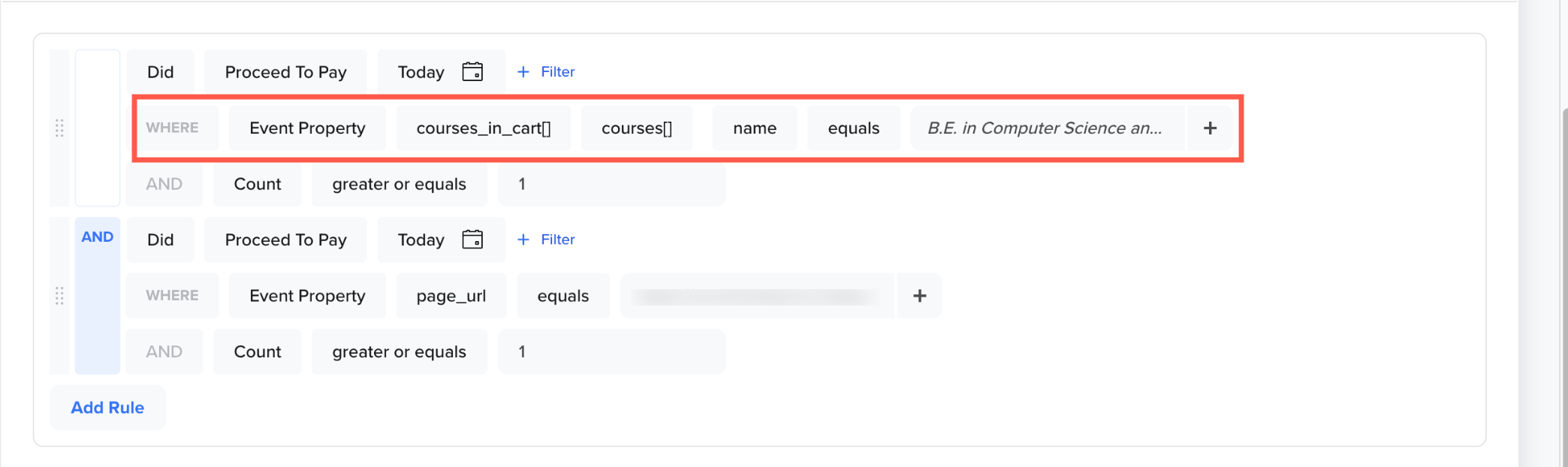
Nested Objects for Event Properties in Segment Builder
- Liquid Tags: Use Liquid Tags to personalize campaign content using attributes stored inside Nested Objects in custom event properties. You can reference nested fields directly using Liquid Tags to personalize campaign content across multiple channels, including Push Notifications, Emails, In-App messages, SMS, WhatsApp, and Webhooks.
The following image shows the Liquid Tags for Nested Objects in custom event properties:
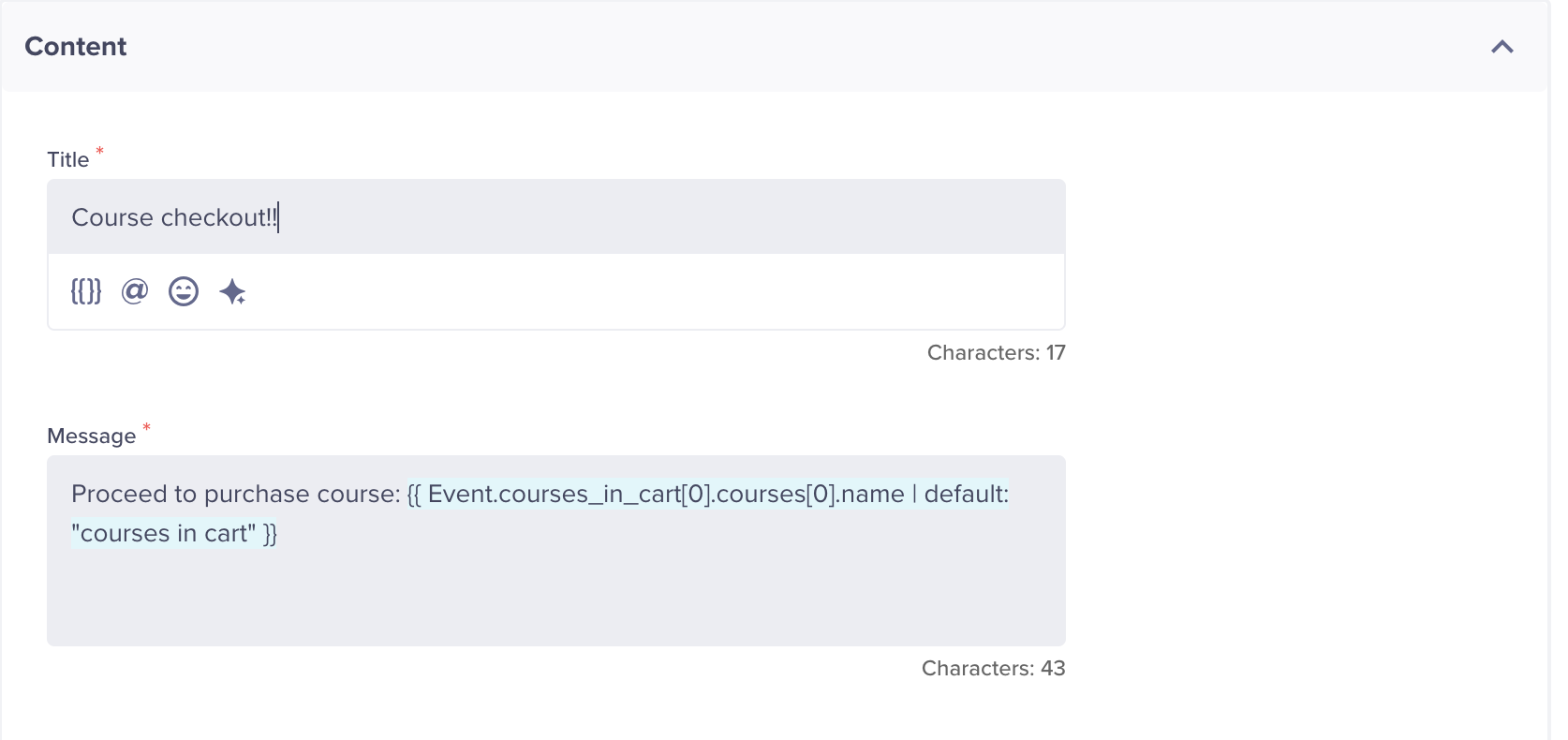
Liquid Tags for Nested Objects in Custom Event Properties
In the above example, {{ Event.Courses_In_Cart[0].Courses[0].Name | default: "Courses In Cart" }} is used. The message dynamically inserts the name of the first course from the first item inside the Courses_In_Cart array when the event triggers. If the value is unavailable, it falls back to the default text Courses In Cart.
This shows how you can access deeply nested event attributes, including arrays within arrays, to personalize real-time messages triggered by custom events.
System Considerations
CleverTap enforces some system limits to maintain performance and stability. If a nested object is sent for an existing flat event property key, the root nested event property is rejected.
The following table lists the limits applied during nested object ingestion to ensure consistent data handling:
| Limit Type | Maximum Value |
|---|---|
| Nesting depth | 3 levels |
| Custom events with nested support (per account) | 10 |
| Root-level nested keys per event (objects/arrays) | 5 |
| Nested objects/arrays keys per nesting depth | 5 |
| Nested elements inside an array | 100 |
| Nested keys inside an object | 100 |
| Payload size | 32 KB. Applies to the total size of evtData (event uploads), including all nested content. |
| Reserved custom event (not supporting nested event properties) | Charged |
NoteIf any of the above system considerations are violated, the relevant root nested event property is rejected. The rejected nested property shows up in Error Stream on CleverTap Dashboard.
FAQs
Can Nested Event Properties be used for segmentation and personalization?
Yes. After ingestion, nested event properties can be used in Segment Builder filters and Liquid Tags. You can reference nested attributes using dot notation to create targeted segments or personalize campaign content.
Are there any reserved custom event properties for nested events?
Yes. The custom eventCharged is reserved for CleverTap’s charged event structure and cannot be used for custom nested events.
Updated 4 months ago