
Nested Objects in User Properties
Learn how to store structured user profile data using nested objects to group related attributes such as preferences, addresses, and subscription settings.
Overview
Nested objects allow you to store structured attributes within user profiles.
For more information, refer to Nested Objects.
Use Cases
Businesses use nested user properties to structure complex profile data.
BFSI
Notify customers when key stakeholders, such as policy beneficiaries or account nominees, lack email addresses. For example, segment users whose Policies.Beneficiaries.Email field is empty.
Media and Entertainment
Target users based on nested viewing preferences, such as preferred genres, languages, or favorite shows stored directly in profile metadata. This improves personalization accuracy and increases click-through rates. For example, segment users whose Preferences.Genres field is empty.
Send Nested User Properties
You can use Nested Objects in user properties to store structured JSON without flattening fields. Nested Objects help model complex profile-level attributes such as subscriptions, policies, preferences, beneficiaries, and so on.
You can send nested user properties through CleverTap SDKs or APIs.
The following payload updates the user profile with a nested preferences object:
{
  "Name": "Jane Doe",
  "CustomerType": "Platinum",
  "InsuranceDetails": {
    "Policy": [
      {
        "PolicyID": "POL123",
        "Type": "Health",
        "PremiumAmount": 1200,
        "Beneficiary": [
          {
            "Name": "John Doe",
            "Email": "[email protected]",
            "DOB": "2020-01-20"
          }
        ]
      }
    ]
  }
}
Use Nested Objects across Platforms
After ingestion, Nested Object fields are available across CleverTap, including user profiles, segmentation filters, and campaign personalization.
-
Profile Page: View structured objects stored in a user’s profile. Each nested user property appears as a dot-separated field under the User Properties tab on the profile. For example,
InsuranceDetails.Policy.Beneficiary.Email. -
Segment Builder: Create conditions using nested attributes, such as
InsuranceDetails.Policy.Beneficiary.DOB. You can combine multiple nested conditions to create granular filters. For example, you can segment users who have at least one policy with an overdue premium or a beneficiary missing contact information.
Dashboard Limitations with Nested User Properties in SegmentsYou may view this message in some areas of the Dashboard:
"Nested user property queries aren’t supported yet. Choose a segment without nested properties to proceed."
Nested user property segments are not yet supported in areas such as Predictions and Bulletins. To continue, use or create a segment with only standard (non-nested) user properties in such areas of the product.
The following image shows how nested fields appear within profile data and can be used to create filters in the Segment Builder:
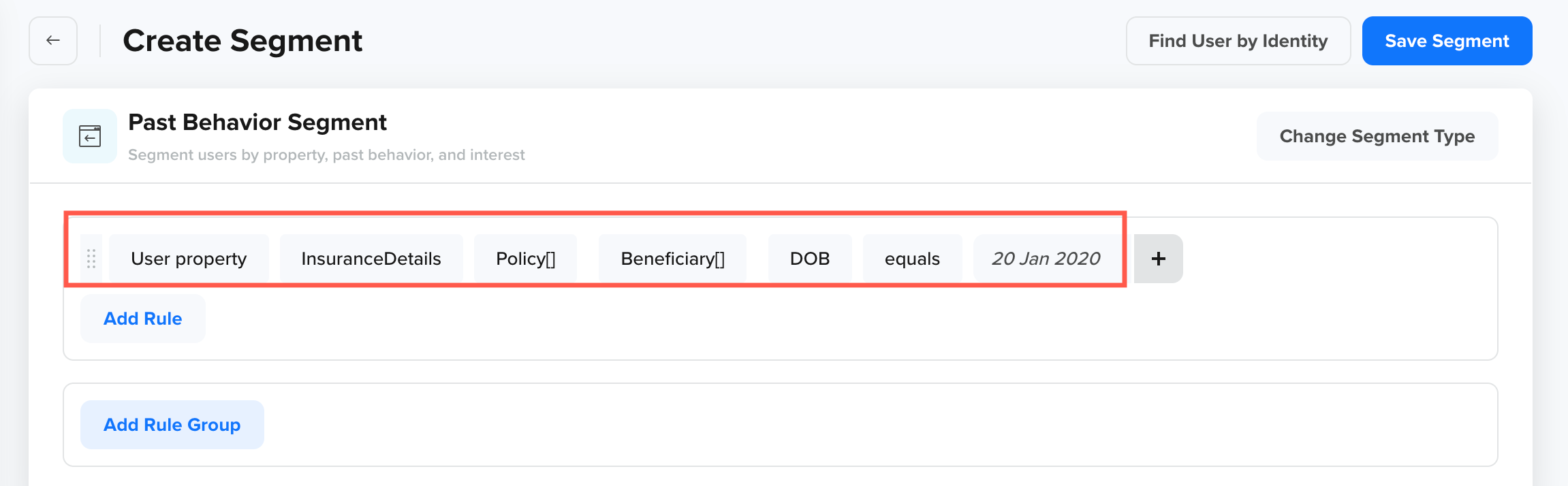
Nested Objects for User Properties in Segment Builder
- Liquid Tags: Use Liquid Tags to personalize campaign content using attributes stored inside Nested Objects in user properties. You can reference nested fields directly using Liquid Tags to personalize campaign content across multiple channels, including Push Notifications, Emails, In-App messages, SMS, WhatsApp, and Webhooks.
The following image shows the Liquid Tags for Nested Objects in user properties:
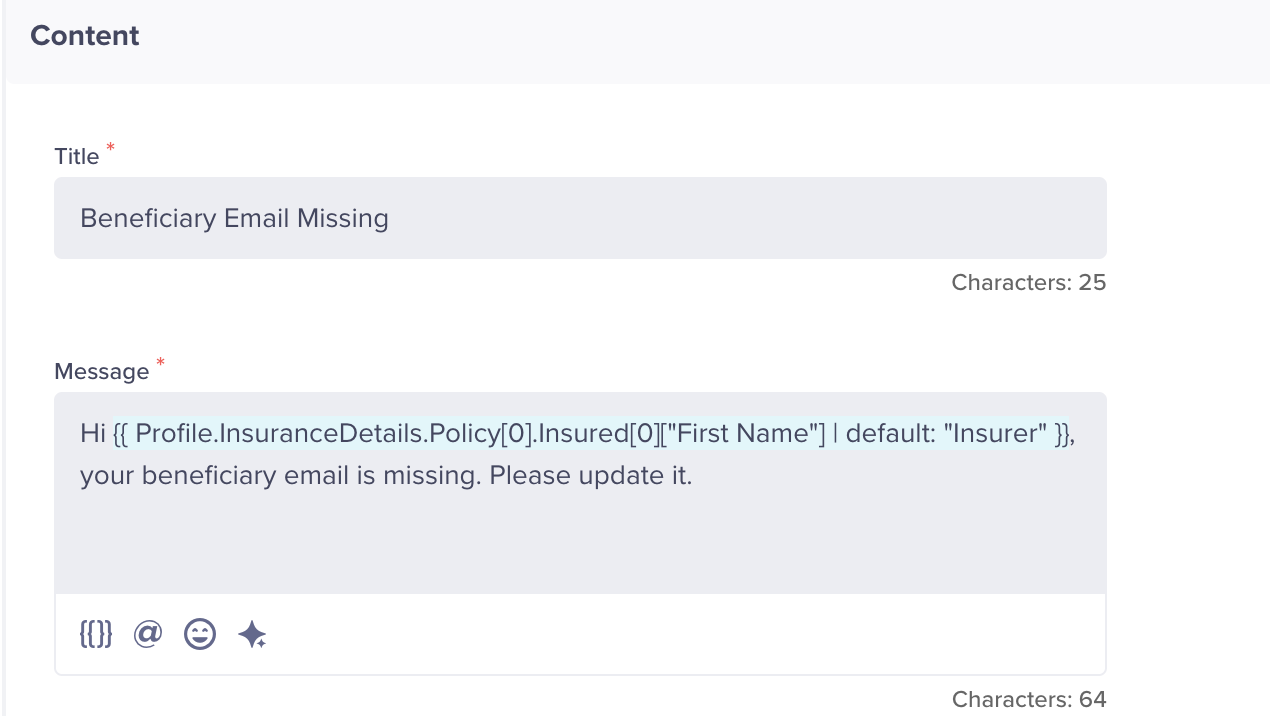
Liquid Tags for Nested Objects in User Properties
You can use dot notation in Liquid Tags to reference nested fields inside user properties. This allows you to dynamically personalize campaign content, such as referencing a user’s policy type or beneficiary name.
System Considerations
CleverTap enforces some system limits to maintain performance and stability. If a nested object is sent for an existing flat user property key, the root nested user property is rejected.
The following table lists the limits applied during nested object ingestion to ensure consistent data handling:
| Limit Type | Maximum Value |
|---|---|
| Nesting depth | 3 levels |
| Root-level keys (objects or arrays) | 5 |
| Nested objects/arrays keys per nesting depth | 5 |
| Nested elements inside an array | 100 |
| Nested keys inside an object | 100 |
| Payload size | 32 KB. Applies to the total size of profileData (profile uploads), including all nested content. |
| Reserved fields for user properties | identity, email, and timestamp remain flat |
NoteIf any of the above system considerations are violated, the relevant root nested user property is rejected. The rejected nested property shows up in Error Stream on CleverTap Dashboard.
FAQs
Can I update a single field inside a Nested Object?
Yes. You can update individual fields within a Nested Object without overwriting the entire structure.
Can Nested Object fields be used for segmentation and personalization?
Yes. Nested fields are available in Segment Builder and can be referenced using dot notation, for example, InsuranceDetails.Policy.Beneficiary.Email. You can also use them in Liquid Tags to personalize campaign content.
Updated 5 months ago