
IntelliChannel
Learn how IntelliChannel ensures every user gets messages through the channel they engage with most, maximizing reach and response.
Overview
IntelliChannel identifies each user’s most effective communication channel based on their engagement across Push, Email, SMS, and WhatsApp.
Clever.AI analyzes user interactions over a rolling 90-day window to determine the channel that consistently drives the highest engagement. The identified channel is stored as a system user property named IntelliChannel and can be used across Segments, Campaigns, and Journeys.
AvailabilityIntelliChannel is available on Pro and Ultimate plans. To access this feature, contact your Customer Success Manager.
With IntelliChannel, marketers can:
- Personalize Communication: Deliver messages via the channel each user prefers.
- Improve Engagement: Boost open and click rates.
- Reduce Communication Fatigue: Avoid sending the same message across multiple channels.
- Optimize Cost: Target users efficiently based on their engagement behavior.
- Streamline Orchestration: Use across Segments, Campaigns, and Journeys for targeted engagement and performance insights.
NextGen Segment BuilderThe IntelliChannel user property is available only for projects using the NextGen Segment Builder.
IntelliChannel Functionality
Clever.AI evaluates user engagement across Push, Email, SMS, and WhatsApp to identify the channel that performs best for each user. It analyzes message interactions, such as sent, viewed, and clicked over the past 90 days, and assigns the channel with the highest engagement as the user’s IntelliChannel.
This property updates automatically as users interact with new messages and is refreshed daily to ensure it reflects recent behavior. Each interaction, whether a view or a click, is treated equally to maintain consistency.
IntelliChannel helps deliver messages via the channel users respond to most often, improving engagement and reducing message fatigue.
Example
Consider a user who regularly engages with multiple channels. Over a given period, they open and click a few Push notifications, occasionally read SMS messages, and also interact with WhatsApp updates.
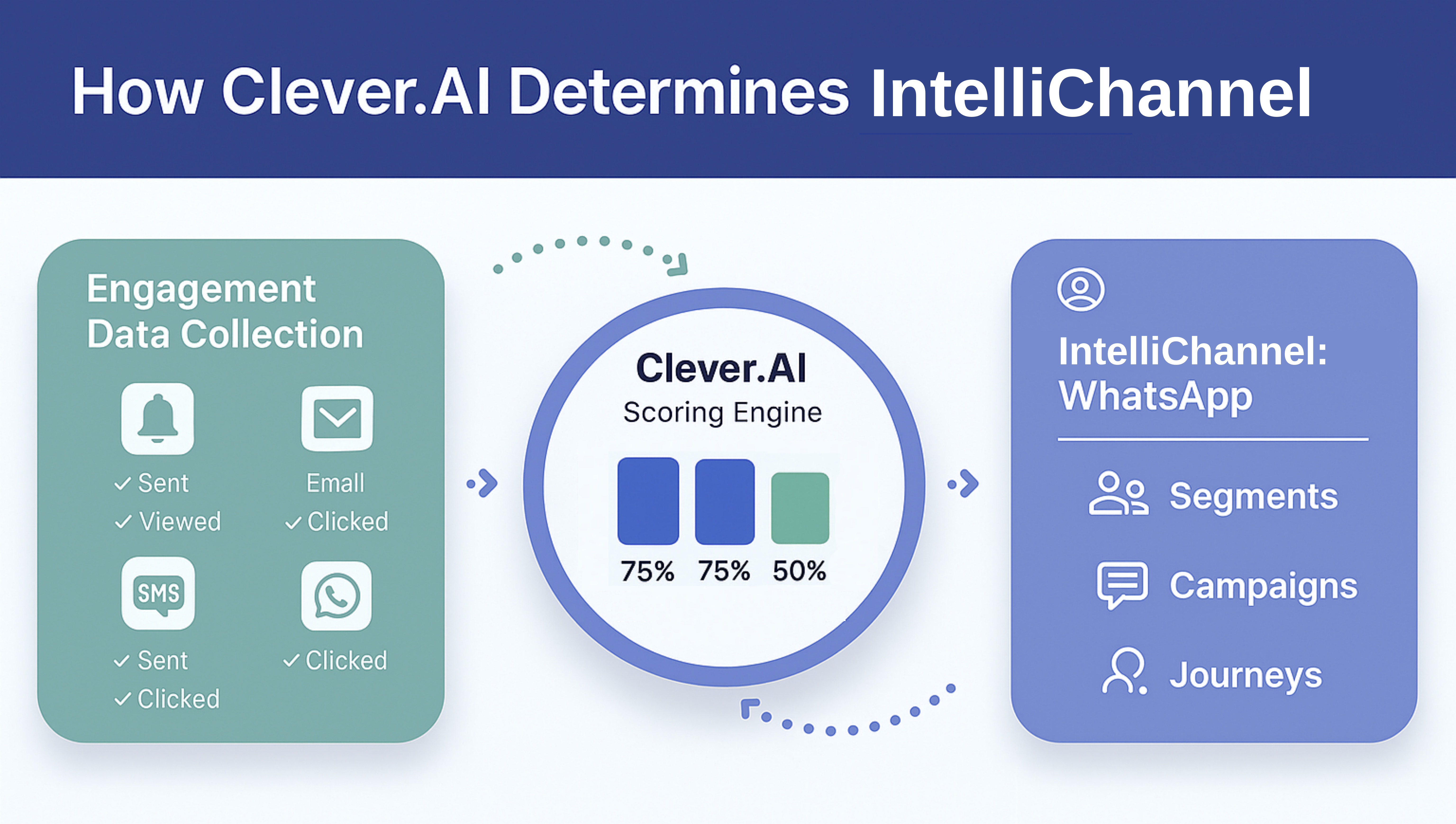
IntelliChannel Calculation
Clever.AI evaluates engagement trends and recency of interactions, giving greater weight to the most recent activity. When two or more channels show similar engagement patterns, the system selects the channel the user interacted with most recently as the IntelliChannel.
This ensures that user preferences remain accurate and up to date, enabling marketers to deliver messages through the channel that offers the highest likelihood of engagement.
Applies Recency Weighting
Clever.AI gives higher weight to the most recent interactions. When two channels show identical engagement levels, the system selects the one where the user engaged most recently. For example, if Push and WhatsApp show similar engagement, but the user’s most recent interaction occurred on WhatsApp, WhatsApp becomes the IntelliChannel.
Assigns and Refreshes
After identifying the most relevant channel using engagement and recency signals, Clever.AI saves that channel as the user’s IntelliChannel property. This value updates automatically as users continue to engage with messages and refreshes daily to ensure it always reflects the latest interaction trends.
Optimizing IntelliChannel Through Re-EngagementRe-engagement campaigns for users with Not Enough Data help Clever.AI gather additional behavioral data, which in turn allows the system to assign a IntelliChannel once enough interactions are recorded.
'Not Enough Data' Explained
An IntelliChannel is recorded only when all of the following conditions are met:
- The account has at least two active channels (for example, Push and Email).
- The user has been reached through two or more channels within the last 90 days.
- The user has recorded at least three total engagements during that period.
If any of these conditions are not met, Clever.AI cannot determine an IntelliChannel. In such cases, the property is marked as Not Enough Data, ensuring that segmentation, campaign targeting, and journey-based use cases rely only on meaningful, verified engagement data.
If you want users with a defined preference for Push to receive a Push campaign, but also want to include users whose channel preference is Not Enough Data, you can create a rule such as:
IntelliChannel = Push
orIntelliChannel = Not Enough Data
This setup ensures that both groups' users are shown to prefer Push, and that those without sufficient data receive the same message.
You can also create separate campaigns for each channel (for example, Push, Email, or SMS) and include users with Not Enough Data in one of them to maintain consistent reach while collecting more engagement data for future classification.)
Using IntelliChannel Across Dashboard
You can use the IntelliChannel property across core CleverTap modules, Segments, Campaigns, Journeys, Analytics, and Profile Exports, to target users through the channels they engage with most.
| Product Area | How IntelliChannel Helps |
|---|---|
| Segmentation | Filter users by their most engaged channel to create precise, channel-specific segments. For example, users whose IntelliChannel is WhatsApp. |
| Campaigns | Use the IntelliChannel property in the Who section to refine targeting and ensure messages are delivered through the channel where users are most responsive. |
| Journeys | Branch users dynamically in a Conditional Split node based on their IntelliChannel. The property is read-only and can only be used for segmentation or branching logic. |
| Analytics | Track and analyze engagement performance by comparing metrics across different IntelliChannels. |
| Profile Exports | Export the IntelliChannel property for analysis to external analytics or CRM systems. |
Create Segments Using IntelliChannel
Use the IntelliChannel property in the NextGen Segment Builder to create audience filters based on each user’s most engaged communication channel.
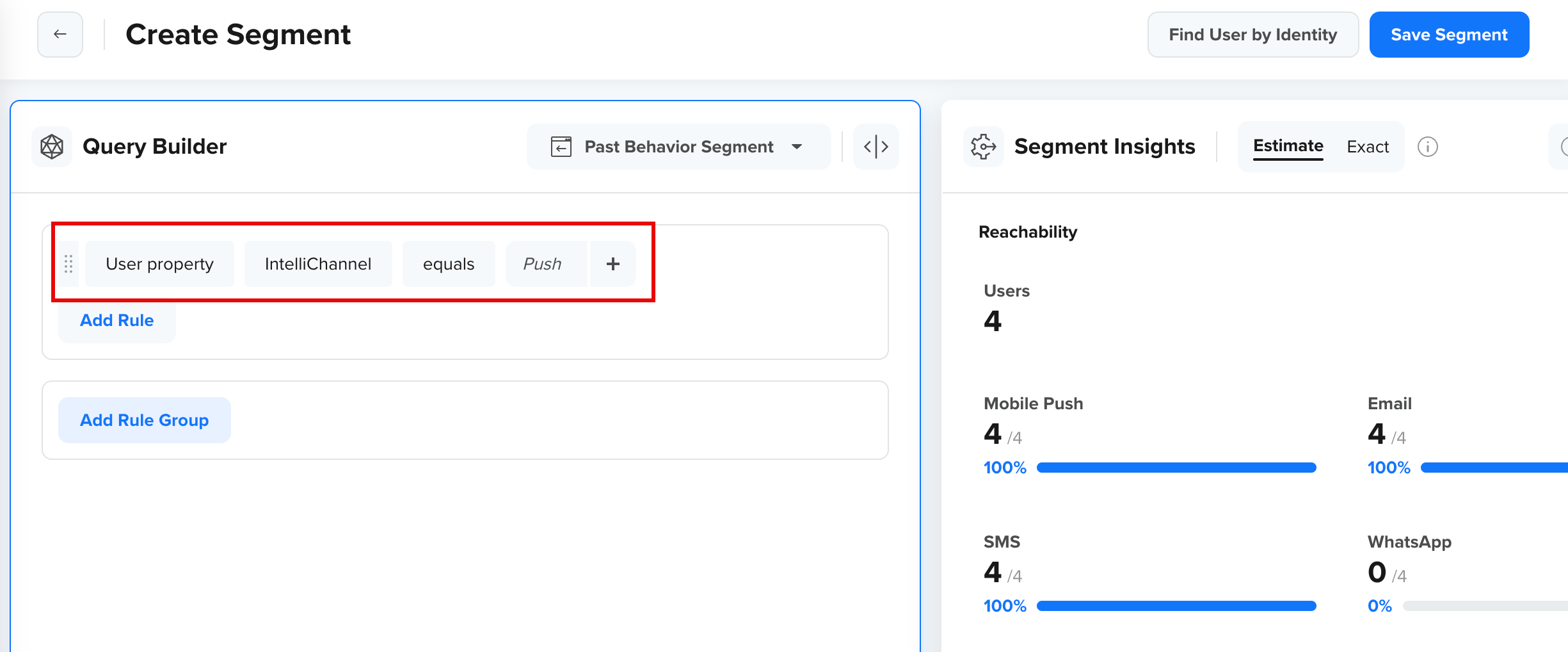
For example,User Property > IntelliChannel equals Push
This filter selects users who primarily engage through Push notifications. Once saved, the segment can be reused in Campaigns or Journeys for targeted communication, helping marketers identify users’ engagement preferences and understand how effectively these users can be reached on their IntelliChannel.
This image shows how to create a user segment using the IntelliChannel property. The Reachability metrics in the Segment Insights section display how many users in the segment can currently receive messages across each active channel, such as Push, Email, SMS, and WhatsApp. Reachability depends on device and channel availability, not on user preference.
IntelliChannel and Estimate Reach
- IntelliChannel identifies the channel where a user shows the highest engagement based on past interactions.
- Estimated Reach shows how many users in this segment (whose IntelliChannel is Push) are currently reachable across all channels based on delivery eligibility.
IntelliChannel reflects engagement behavior, while Estimated Reach represents delivery potential.
The following image shows how IntelliChannel differs from Estimated Reach:
IntelliChannel and Estimate Reach
Personalize Campaigns Using IntelliChannel
When creating a Campaign, use the IntelliChannel property in the Who section to target users most likely to engage with that channel.
For example, for a product update or feature announcement, you can use IntelliChannel = Push to reach users who regularly engage with push notifications, while excluding those whose IntelliChannel is Email or SMS. This ensures the message reaches users where they are most likely to interact, reducing overlap and message fatigue.
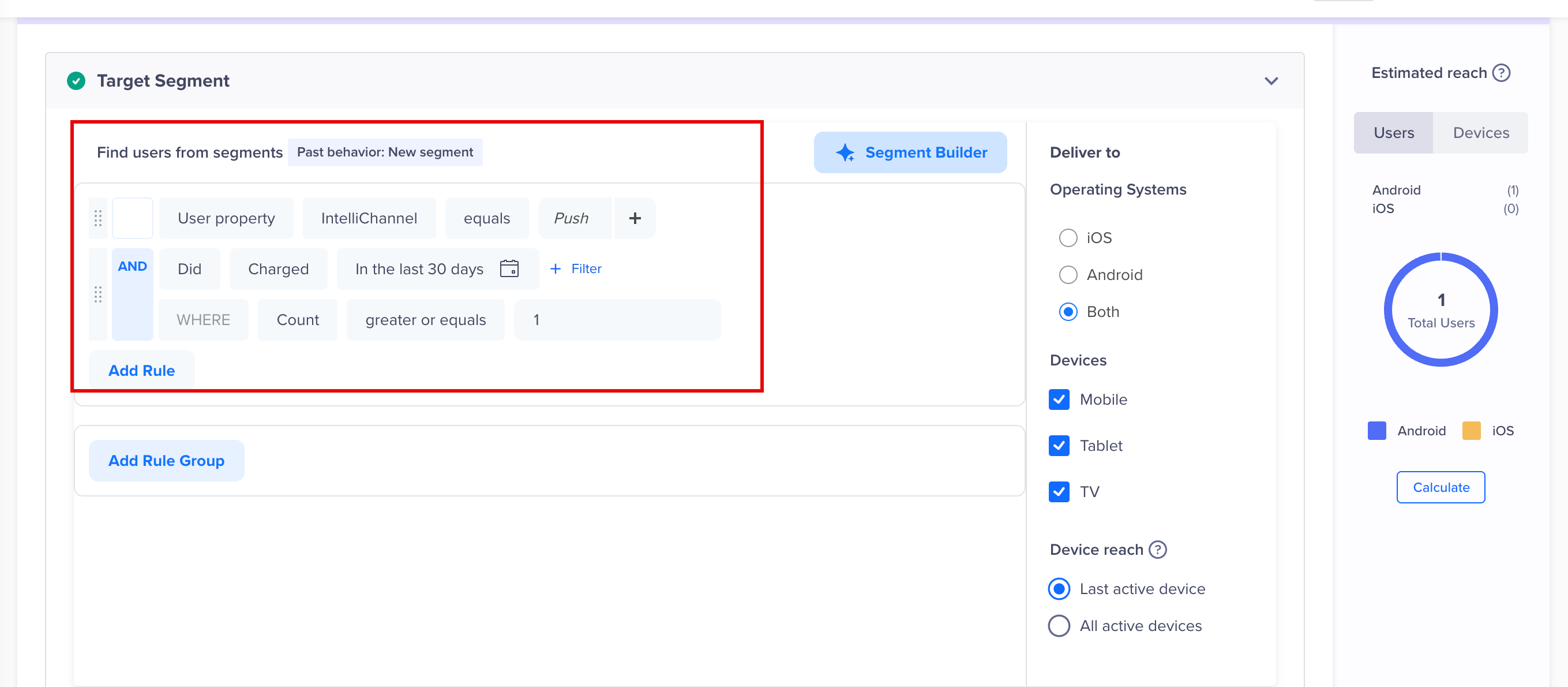
Using IntelliChannel in Campaigns
Personalize Journeys Using IntelliChannel
Within Journeys, use the IntelliChannel property to branch users by their most-engaged channel with a Conditional Split node.
For example, you can use IntelliChannel in a reactivation journey to route users via their most active channel, send Emails to users with IntelliChannel set to Email, and push messages to those who primarily engage through Push.
| Path | Condition | Engagement Action |
|---|---|---|
| Path 1 | IntelliChannel = Push | Send Push Notification |
| Path 2 | IntelliChannel = Email | Send Email Campaign |
This setup automatically routes users through the channel that drives the highest engagement, eliminating the need for separate journeys.
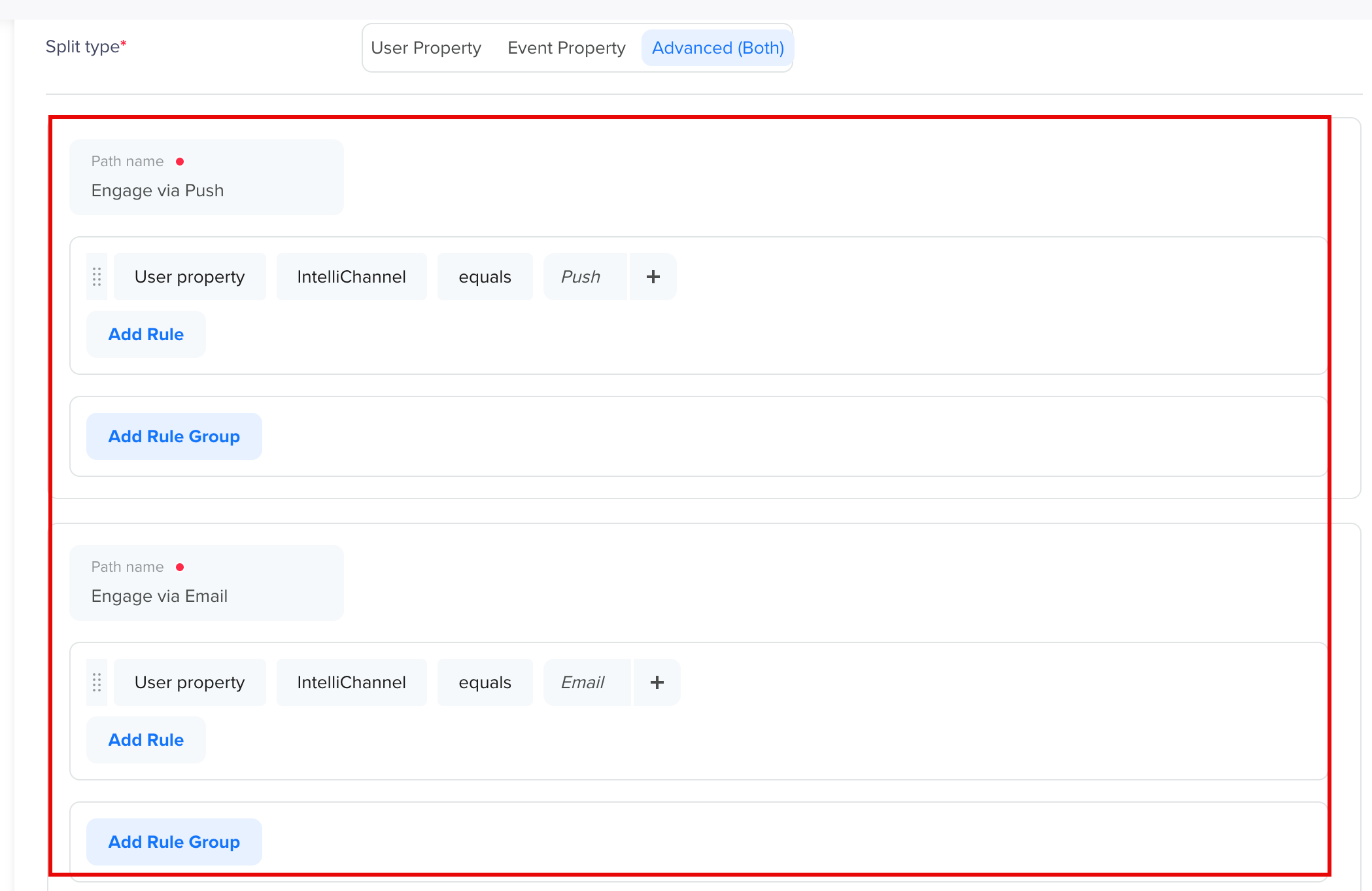
IntelliChannel Setup in Conditional Split Journeys
The following image shows the Journey with a conditional split node that branches users by their most engaged channel:
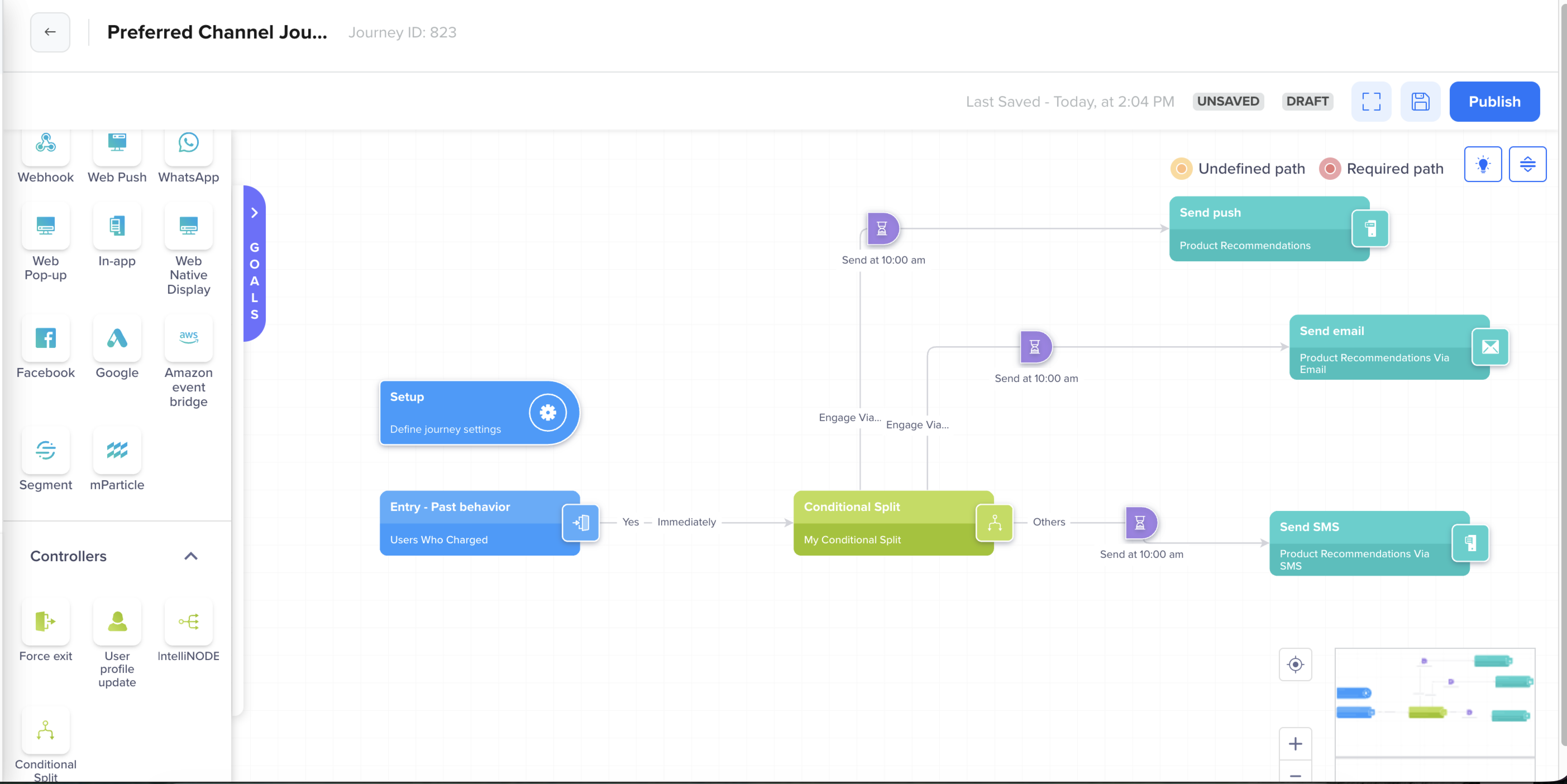
Personalize Journey Basis IntelliChannel
FAQs
The following are the answers to common questions about how IntelliChannel works and how to use it effectively.
What happens if a user unsubscribes from their IntelliChannel?
If a user unsubscribes from their IntelliChannel, CleverAITM detects it during the next daily refresh and re-evaluates their engagement across active channels. The IntelliChannel is then updated automatically to SMS, Email, or another channel where the user has shown the highest recent engagement.
Why am I not able to see the IntelliChannel property in my Segment Builder?
The IntelliChannel property is available for all entities that use the NextGen Segment Builder. If you are using Legacy Segment Builder, the property does not appear in the list of available user properties.
Updated about 1 month ago