
Global Device Filter
Learn how to use the Global Device Filter to precisely target users across all their devices based on specific device attributes.
Overview
The Global Device Filter (GDF) refines targeting at the device level, ensuring Campaigns and Journeys deliver only on devices that meet specific attributes such as app version, operating system, or browser.
Users can apply targeting in three ways:
- User-level rules to qualify users and send campaigns to all their devices.
- Device-level rules with GDF to target only specific devices, regardless of other devices the user owns.
- A combination of both so user behavior qualifies them, but delivery occurs only on devices matching the filter.
This capability ensures campaigns remain relevant, prevent spillover to ineligible devices, and adapt to conditions such as OS, app version, or browser type.
Filter AvailabilityThe Global Device Filter is available in Segments, Campaigns, and Journeys.
The following image shows how to use the Segment Builder with the Global Device Filter.
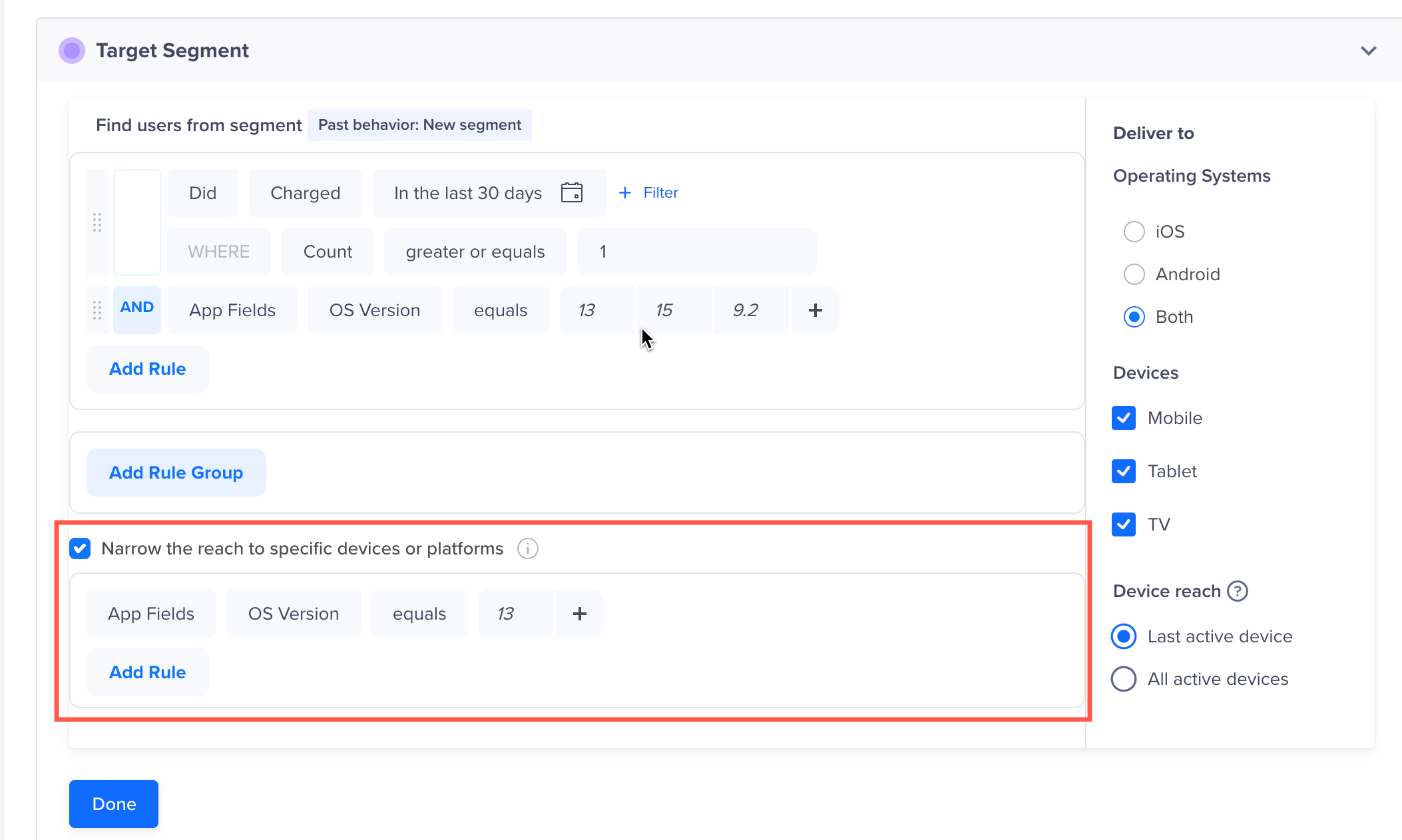
Global Device Filter
You can select Narrow the reach to specific devices or platforms to apply device-specific filters and limit delivery to matching devices.
Use Cases
The following use cases explain the difference between targeting all devices and using the Global Device Filter to target specific devices.
Target All Devices (Global Device Filter Not Required)
Scenario: Send a loyalty campaign to all users who purchased in the last 30 days.
Rule: Did Purchase in last 30 days → All devices of that user receive the campaign.
Key Point: The Global Device Filter is not needed when campaign delivery does not depend on device attributes such as OS version, app version, or browser.
Target Specific Devices (Global Device Filter Required)
Scenario: Send an upgrade prompt only to users launching the app on OS version 13.
Rule: Did App Launch in the last 30 days
Global Device Filter: OS = 13
Consider a user who launched the app in the last 30 days and owns devices on OS versions 13, 14, and 15. The user qualifies based on the rule, but the Global Device Filter ensures delivery happens only on the iOS 13 device.
Key Point: The Global Device Filter prevents irrelevant delivery by narrowing down to the exact device type you want to target.
Engagement with Notifications (Global Device Filter Required)
Scenario: Understand notification click behavior across browsers.
Rule: Did Notification Clicked
Global Device Filter: Browser = Chrome → Only Chrome devices are included.
Key Point: Enables browser-specific messaging or experiments by targeting only Chrome devices.
Win-Back Campaigns for Dormant Users (Global Device Filter Required)
Scenario: Re-engage inactive users on older OS versions.
Rule: Did Not App Launch in last 30 days + OS in[13,14,15,16]
Global Device Filter: OS = 13 → Only dormant OS 13 devices are targeted.
Key Point: Focuses win-back efforts on the right devices.
FAQs
The following are the commonly asked questions:
Do I always need to use the Global Device Filter?
No. Use GDF only when delivery must be restricted to specific devices.
Can I use GDF without user-level rules?
Yes. You can target devices directly by applying GDF conditions such as OS, app, or browser versions.
What happens if a user owns multiple devices but only one matches the filter?
The user qualifies for the campaign, but delivery occurs only on the devices that match the filter criteria.
How is GDF different from user-level rules?
- User-level rules qualify users based on behavior or demographics and deliver to all their devices.
- GDF restricts delivery only to devices with specific attributes.
- You can use them separately or together.
Where can I use the Global Device Filter?
Global Device Filter is available in Segments, Campaigns, and Journeys.
Updated 10 months ago