
Frequently Bought Together
Learn how to recommend products that are commonly purchased together to increase cross-sell opportunities.
Overview
Frequently Bought Together recommendations surface items that are commonly purchased alongside products a user has recently bought. Using a hybrid recommendation algorithm, the strategy analyzes co-purchase patterns across your catalog and personalizes results based on each user's individual purchase history.
Unlike aggregate strategies such as Popular or Best Sellers, Frequently Bought Together recommendations are unique to each user, surfacing complementary items most relevant to what they have recently purchased.
Because recommendations are computed per user, this strategy requires individual purchase data to generate results. Users with insufficient purchase history within the configured time window receive the configured fallback strategy instead.
Use Cases
Frequently Bought Together recommendations work best when purchase-driven, complementary product discovery is needed, as follows:
- Post-purchase campaigns: Surfaces items commonly bought with a user's recent purchase. For example, a follow-up email to a user who bought Men's Slim Fit Denim Jeans, recommending items frequently purchased alongside jeans, such as a belt or a casual shirt.
- Cart and checkout upsell: Encourages add-on purchases at the point of conversion. For example, recommending complementary items on the order confirmation page based on what was just purchased.
- Push notifications: Re-engages recent buyers with items that pair well with their purchase. For example, a push notification to a user who recently bought a Women's Floral Maxi Dress recommending accessories frequently bought with that item.
- Personalized homepage sections: Keeps returning users engaged with relevant complementary items based on their purchase history.
Strategy Logic
Frequently Bought Together recommendations are computed per user using a hybrid algorithm that combines each user's individual purchase history with catalog-level product similarity.
During setup, you select the purchase event that captures transaction data and configure the time window for evaluating purchase activity. The system applies time-decay weighting to each purchase — recent purchases influence recommendations more than older ones. Product embeddings are then used to identify catalog items most similar to each user's recently purchased products.
At serving time, recommendations are personalized to each user. The system retrieves the user's recent purchase history, weights each purchase by recency, and surfaces catalog items most similar to those purchases using product embeddings. Users with no purchase history within the configured time window receive the configured fallback strategy instead.
Common interaction events include:
| Industry | Event |
|---|---|
| ECommerce | Charged |
| Food & Grocery | Order Placed |
Required Inputs
The following inputs are required:
| Input | Description |
|---|---|
| Consideration Criteria | The user action used to identify purchase patterns and build each user's purchase profile. |
| Mapping | Connects the event property containing the item identifier to the identity column of your catalog. |
Optional Inputs
The following inputs are optional:
| Input | Description |
|---|---|
| Time window | Period over which purchase activity is evaluated. If not set, all available historical data for the selected event is used. |
| Consideration Criteria | Narrows which purchases count toward each user's purchase profile. For example, filter by gender or membership tier. |
| Fallback Strategy | Fills recommendation slots when a user has insufficient purchase history. Fallback items are deduplicated against results before being returned. If no fallback is configured and insufficient purchase data exists, the default values are returned. |
Create Frequently Bought Together Strategy
This section helps you set up a strategy that surfaces personalized recommendations based on each user's purchase history.
Prerequisites
Before you begin, check if the following are in place:
- A catalog is uploaded and active. • At least one purchase event is being tracked, such as
Charged. - The tracked event references the same item ID as the catalog identity column. If they do not match, purchases cannot be attributed to catalog items.
- Users have sufficient purchase history to support the strategy and generate personalized results. Configure a fallback strategy for users with limited data.
Set Up Frequently Bought Together Recommendation
This section walks you through the steps to create a Frequently Bought Together strategy. Let us take an example: an apparel retailer wants to recommend items most similar to what each user has recently purchased, based on purchase activity over the last 30 days.
- Select Strategy Type
- Select Catalog
- Define Consideration Criteria
- Map Catalog Column to Event Property
- Enter Basic Details
Select Strategy Type
Select Hybrid Recommendation Strategy from the list of strategy types.
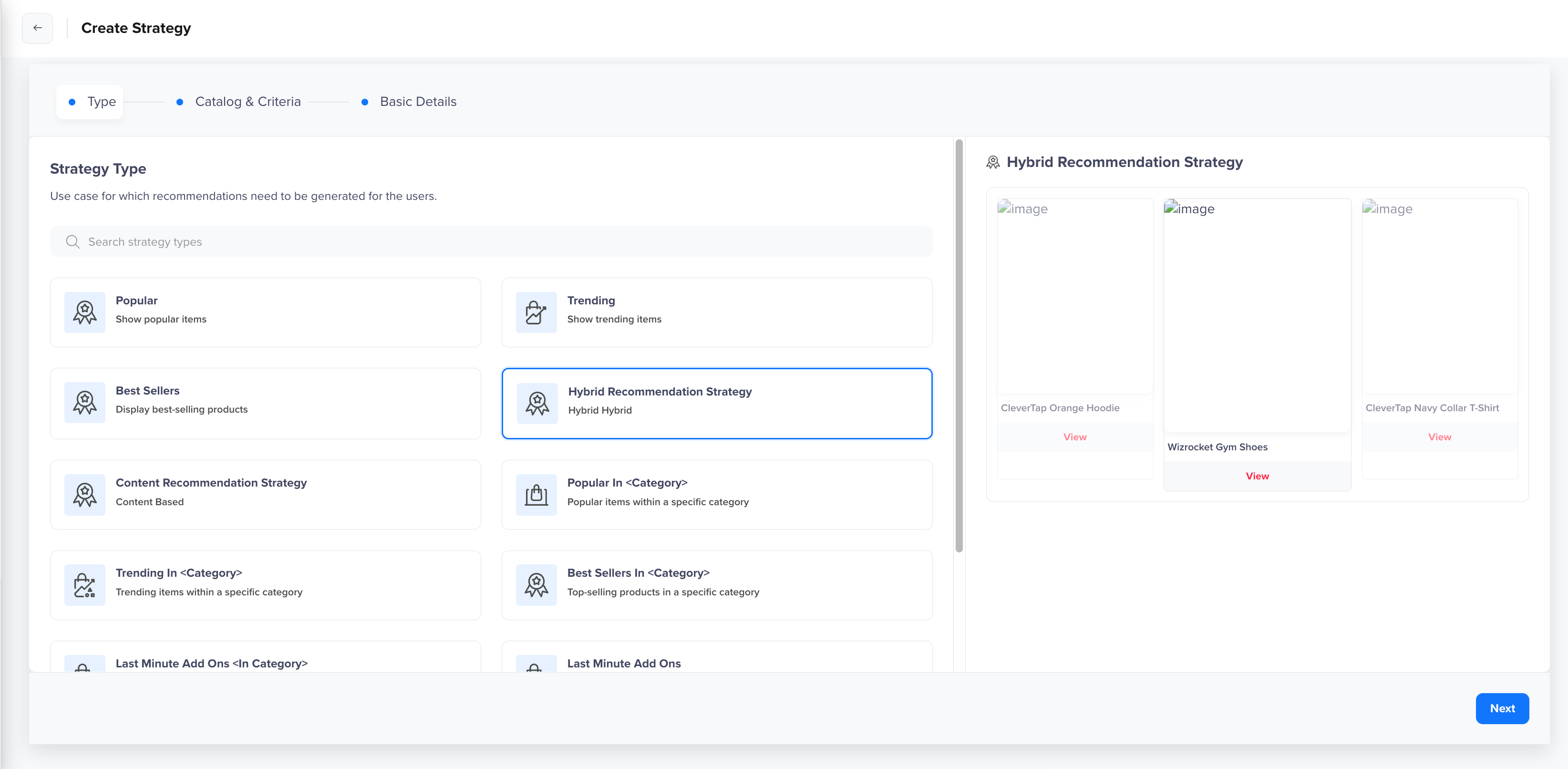
Select Strategy
Select Catalog
Select the catalog to use. The catalog must be active and contain the items you want to recommend. For example, select the catalog containing your apparel inventory.
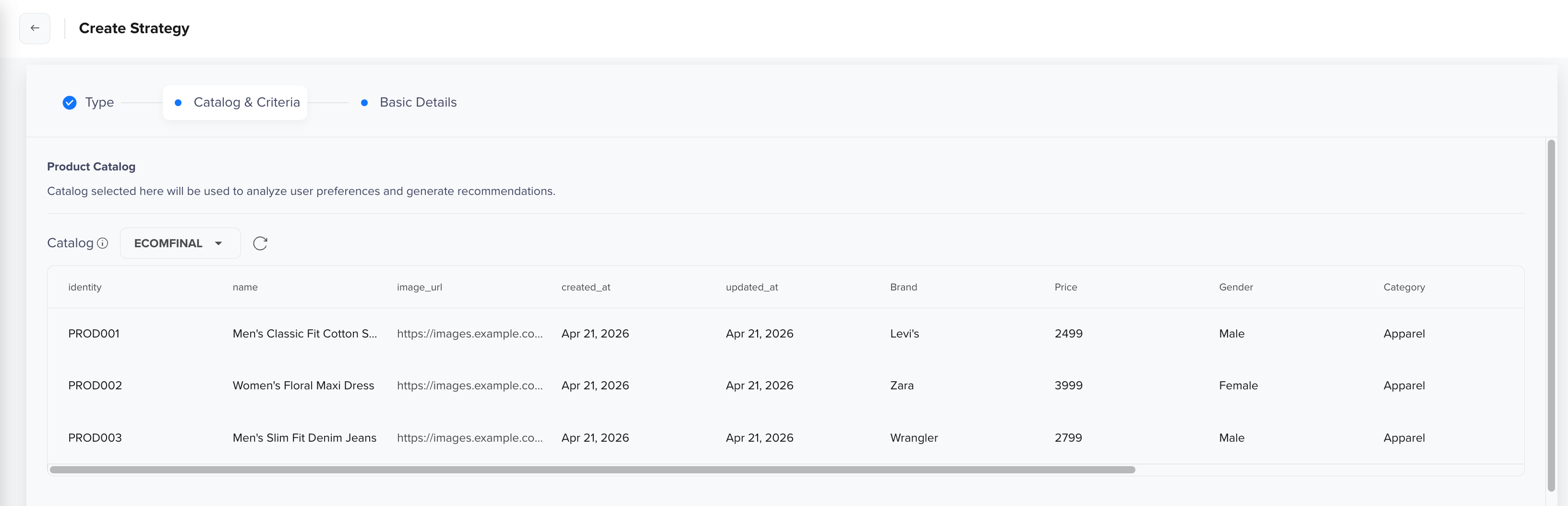
Select Catalog
Define Consideration Criteria
Pick the single event that captures purchase activity. This determines which transactions are used to build each user's purchase profile.
| Event | What it measures |
|---|---|
| Charged | Items most recently purchased by each user (standard CleverTap purchase event) |
| Any custom event | Whatever purchase signal matters most to your use case |
For example, select Charged as the purchase event and set the lookback period to Last 30 days. This tells the system to evaluate each user's purchase activity from the past 30 days when generating personalized recommendations.

Define Consideration Criteria
You can click Add Rule to apply property filters that narrow which purchases count. For example, filtering Charged by Gender = Female counts only purchases from female users when building each user's purchase profile.
Map Catalog Column to Event Property
Map the event property containing the item identifier to the identity column of your catalog. This tells the system which catalog item each purchase belongs to. For example, map the catalog identity column to the Product Id event property of the Charged event.

Map Catalog Column to Event Property
NoteIf this mapping is incorrect or missing, the system cannot match purchases to catalog items, and the strategy will return no results.
Enter Basic Details
After setting up the Catalog and Criteria tab, click Next to enter the following basic details:
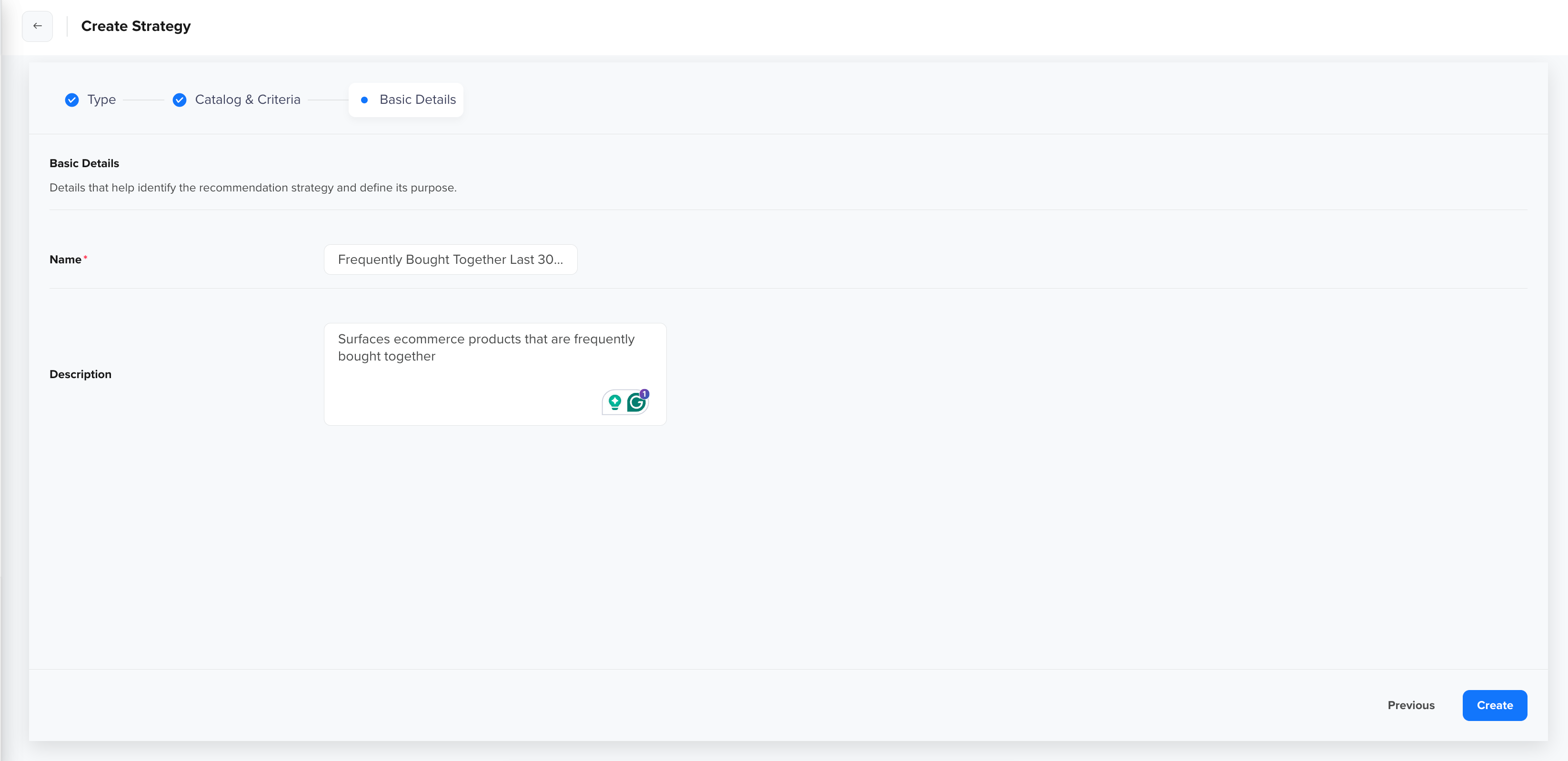
Enter Basic Details
| Field | Details |
|---|---|
| Name | Name the strategy using a clear, descriptive name that reflects the use case. For example, Frequently Bought Together. |
| Description | An optional description for your strategy. |
After adding these details, click Save. Once the strategy is saved and purchase events are evaluated, the strategy becomes Active and can be used for campaign personalization.
In this case, the strategy surfaces items most similar to what each user has recently purchased. Because recommendations are personalized for each user, each user receives a unique set of suggestions based on their individual purchase history, making it suitable for post-purchase emails, cart-upsell campaigns, or personalized homepage sections.
Personalize Campaign Using Frequently Bought Together Recommendation
Once the strategy is active, you can use it to personalize recommendations in your campaigns. To configure recommendations within a campaign, click Personalize to open the Personalize Setup panel, then select the Recommendations tab.
Configure the following:
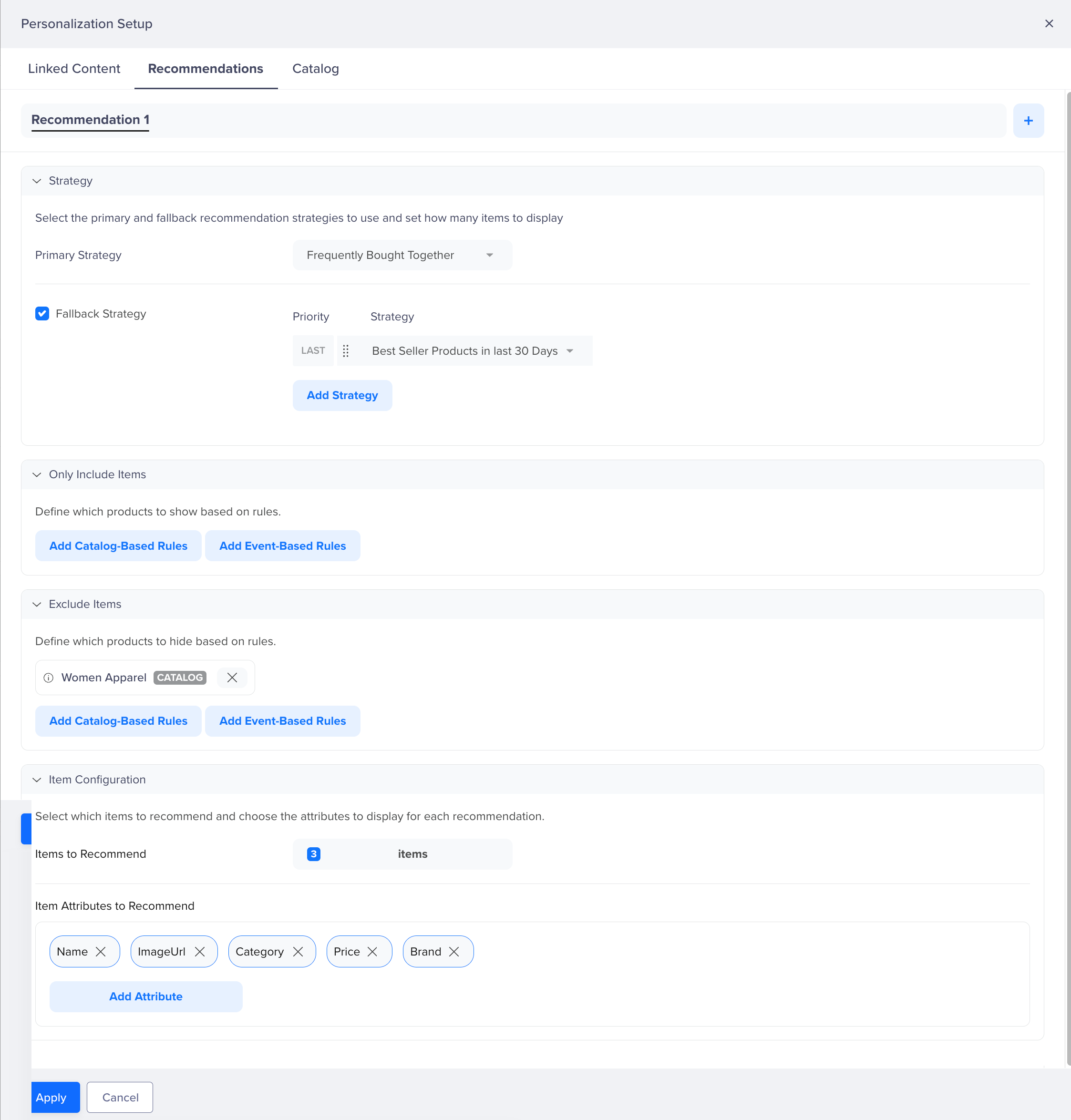
Personalize Campaign Using Recommendation
Strategy
Select the primary strategy to use for recommendations. For example, select Frequently Bought Together to surface personalized item recommendations for each user based on their recent purchase history.
Optionally, enable Fallback Strategy to specify one or more fallback strategies that activate when the primary strategy cannot return enough items, for example, when a user has insufficient purchase history. Fallback strategies are evaluated in order of priority, with the last fallback used only if all preceding strategies return insufficient results. Fallback items are deduplicated against results before being returned.
For example, set Best Seller Products in Last 30 Days as a fallback so recommendation slots remain filled for users with limited purchase history.
Only Include Items
Define rules to restrict which catalog items are eligible for recommendation. You can add Catalog-Based Rules to filter by catalog attributes, or Event-Based Rules to filter based on user behavior. For example, adding a catalog-based rule Category = Apparel ensures only apparel items appear in the recommendation block.
Exclude Items
Define rules to explicitly remove certain catalog items from recommendations. For example, adding a catalog-based rule Women Apparel ensures women's apparel products do not appear in the recommendation output.
Item Configuration
Specify how many items to recommend and which catalog attributes to return for each item. For example, set Items to Recommend to 3 and select Name, ImageUrl, Category, Price, and Brand as the Item Attributes to Recommend, so the campaign can render each product with its name, thumbnail, category, price, and brand. Once configured, click Apply to save the personalization setup for the campaign.
FAQs
What makes Frequently Bought Together different from Best Sellers or Popular?
Best Sellers and Popular rank items based on aggregate purchase or engagement volume across all users. Frequently Bought Together identifies items most similar to what each individual user has recently purchased and returns a unique, personalized set of recommendations per user. Use Best Sellers or Popular for catalog-wide discovery; use Frequently Bought Together when recommendations should reflect each user's own purchase history.
Are Frequently Bought Together recommendations personalized?
Yes. Recommendations are computed per user using a hybrid algorithm that combines each user's individual purchase history with product embeddings. Each user receives a distinct set of recommendations based on their own recent purchases.
How are items selected for Frequently Bought Together recommendations?
The strategy evaluates each user's purchase history within the configured time window and applies time-decay weighting; recent purchases count more than older ones. For each purchased item, the system identifies catalog items with the highest product similarity using vector embeddings. Scores are aggregated across all recently purchased items, and the top-ranked results are returned.
What happens if a user has no purchase history?
The strategy falls back to a separately configured fallback strategy. Fallback items are deduplicated against the results before being returned. If no fallback is configured, the default value is returned.
When should I use Frequently Bought Together recommendations?
Use this strategy to surface personalized recommendations based on each user's purchase behavior, for example, in post-purchase emails, cart-upsell campaigns, or personalized homepage sections for returning buyers.
Updated about 3 hours ago